
Creating Transport Status Reports (EDI IFTSTA)
The International Multimodal Status Report (EDI IFTSTA) is a transaction sent by the party responsible for the physical movement of goods — a carrier, a freight forwarder, or a supplier acting on their behalf — to report the transport status of a consignment, or a change in that status, to the ordering party.
Unlike the DESADV, which describes what is being shipped, the IFTSTA describes where it is and what has happened to it. A status report may be sent on the occurrence of an event (departed, arrived, delivered), on a scheduled basis at agreed times, in response to a request for information, or on the occurrence of an exception such as a customs refusal or a lost pallet.
The defining feature of the IFTSTA is that it is built around status events: one message can carry many consignments, each consignment can carry many status events, and each event can be narrowed down to individual goods items and SSCCs within that consignment.
This guide walks you through creating an EDI IFTSTA in the EDI Generator using the IKEA D96A partner definition.
Creating an EDI IFTSTA from Scratch
If you need to initiate a Transport Status Report manually, follow these steps using our sample scenario.
Scenario Context
- Partner: IKEA
- Transport Status Number:
STA-778401 - Message Date:
2026-09-10(current date) - Carrier (you): GLN
5412345000105, transport desk on+31 20 123 4567 - Consignor (supplier): GLN
5412345500001 - Consignee (IKEA): GLN
7318280010002 - Delivery Party: GLN
7318280010026 - Transport document number:
CONS-99231(dated2026-09-08), Despatch advice:DES-541288 - Vehicles:
ABX712(consignment 1),ABX713(consignment 2), containerMSKU7231884, seal21876 - Consignment 1 —
CONS-99231, 2 EURO pallets, partially delivered:- Pallet 1 — SSCC
354123455000010056,412.5KG — delivered2026-09-10at09:42, delivery noteDN-5/2334 - Pallet 2 — SSCC
354123455000010063,198.4KG — reported lost
- Pallet 1 — SSCC
- Consignment 2 —
CONS-99232, still en route, estimated arrival2026-09-11at14:00, next status report due2026-09-11
Start Transport Status Report Creation
- In the side menu, navigate to IFTSTA (or Outgoing Types > IFTSTA International Multimodal Status Report Message if nested).
- Click the Create button in the top-right corner.
- Select your partner (e.g., IKEA) from the dropdown.
- The EDI editor will load the structure for the IFTSTA document.
For a detailed guide on how the EDI Editor interface works (including how to add segment iterations, use Basic or Advanced loop modes, and locate validation errors), see Create New EDI File.
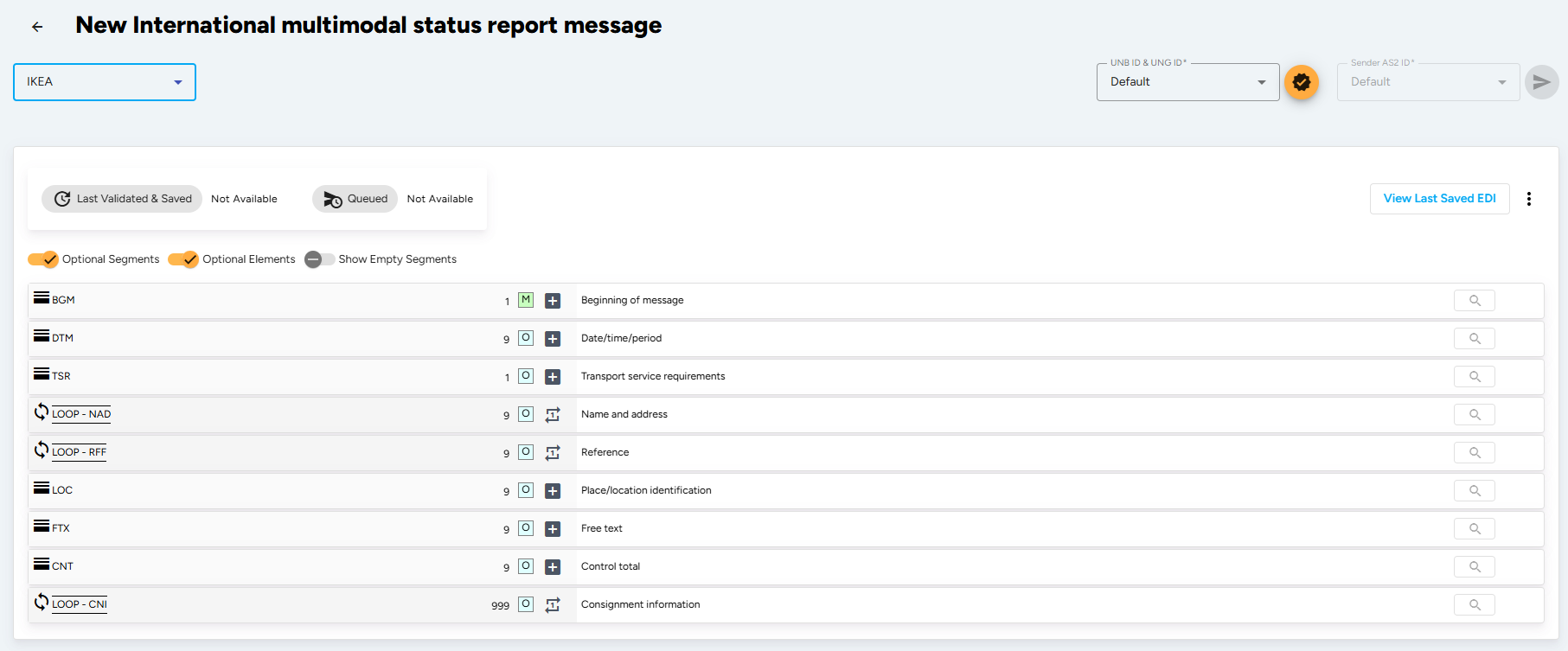
The UNA, UNB and UNH service segments are generated automatically by the EDI Generator from the partner profile you selected. You only fill in the segments described below, starting at BGM.
Enter Beginning Segment Details (BGM Segment)
The BGM segment indicates the type and function of the message and carries the transport status number. All references other than the document number go in the RFF segment.
- Document/message Name, Coded (BGM010-01): Enter
44(Transport status report). Use77(Consignment status report) when the report is scoped to a single consignment rather than to the transport as a whole. - Document/message Number (BGM020): Enter your unique transport status number.
- Message Function, Coded (BGM030): Enter
9(Original). Use1(Cancellation),4(Change),5(Replace) or7(Duplicate) as applicable — when cancelling or changing, the previous status report number must be given in the RFF segment.
Enter the Message Date (DTM Segment)
The header DTM segment specifies the date on which the status report itself was produced. Identification of the document/message date (qualifier 137) is mandatory in every EANCOM message.
- Date/time/period Qualifier (DTM010-01): Enter
137(Document/message date/time). - Date/time/period (DTM010-02): Enter the date in the format CCYYMMDD.
- Date/time/period Format Qualifier (DTM010-03): Enter
102to specify the format you used as CCYYMMDD.
Do not put event dates here. Dates that describe when something happened to the goods belong in the DTM segment inside the STS group, so that each status event carries its own timestamp.
Define Party Identification (NAD Loop)
The NAD Loop identifies the trading partners involved in the status report. Identification of the Carrier (CA) and the Consignor (CZ) is mandatory in a transport status message — either here at header level, or in the NAD segment inside the STS group. A consignee or freight forwarder may also be identified at this level.
Where a GLN is available, parties are identified in coded form only — the clear-text composites (Name And Address (NAD030) through Country, Coded (NAD090)) are used only when a coded identification cannot be used.
- Carrier (CA):
- Party Qualifier (NAD010): Select
CA(Carrier). - Party Id. Identification (NAD020-01): Enter the 13-digit GLN.
- Code List Responsible Agency, Coded (NAD020-03): Select
9(GS1).
- Party Qualifier (NAD010): Select
- Consignor (CZ): add another iteration with qualifier
CZand the GLN of the party that ordered the transport. - Consignee (CN): add another iteration with qualifier
CNand the GLN of the party intended to receive the goods. - The other qualifier available at this level is
FW(Freight forwarder).
Add Contact Details (CTA and COM Segments)
The CTA loop nested inside NAD gives the receiver someone to call when a status raises a question — which, on an exception report, is the difference between a phone call and a chargeback.
- Contact Information (CTA):
- Contact Function, Coded (CTA010): Enter
IC(Information contact),TR(Transport) orDL(Delivery contact). - Department Or Employee (CTA020-02): Enter the department or person name in clear text.
- Contact Function, Coded (CTA010): Enter
- Communication Contact (COM):
- Communication Number (COM010-01): Enter the number or address.
- Communication Channel Qualifier (COM010-02): Enter
TE(Telephone),EM(Electronic mail) orFX(Telefax).
Enter Reference Information (RFF Loop)
The header RFF loop carries the references that apply to the whole message — most importantly the transport instruction or transport document the status relates to. Each reference may be followed by its own DTM segment.
- Transport Document Number (first iteration):
- Reference Qualifier (RFF010-01): Enter
AAS(Transport document number). - Reference Number (RFF010-02): Enter the transport document or consignment note number.
- DTM: Enter Date/time/period Qualifier (DTM010-01)
171(Reference date/time), the document date and format102.
- Reference Qualifier (RFF010-01): Enter
- Despatch Advice Number (add another iteration):
- Reference Qualifier (RFF010-01): Enter
AAU(Despatch note number). - Reference Number (RFF010-02): Enter the DESADV number this status relates to.
- Reference Qualifier (RFF010-01): Enter
- The other qualifier commonly used here is
TIN(Transport instruction number).
Identify Each Consignment (CNI Loop)
The CNI segment opens the detail section and identifies one consignment for which status is being reported. Add one CNI iteration per consignment; every status event that follows belongs to the CNI above it until the next CNI starts.
- Consolidation Item Number (CNI010): Enter a serial number differentiating each separate consignment in the report, starting at
1. - Document/message Number (CNI020-01): Enter the consignor’s shipment reference number for this consignment.
- Consignment Load Sequence Number (CNI030): Optionally enter the sequence in which the consignment is to be, or has been, loaded — useful on multi-drop routes.
Report the Status Event (STS Segment)
This is the core of the message. The STS segment states what has happened, and optionally why. It is mandatory within the CNI loop, and repeats — one iteration per event you are reporting.
- Status Type, Coded (STS010-01): Enter
1(Transport). - Status Event, Coded (STS020-01): Enter the event being reported:
13– Collection/pick-up, completed.21– Delivery, completed.31– En route.49– Lost.1E– Arrived;6E– Booked;72B– Receipt of goods fully acknowledged;76E– Not collected.
- Status Reason, Coded (STS030-01): Only used to explain an exception:
13– Customs refusal;16– Destination incorrect;38– New delivery arrangements;46– Payment not received;54– Special service required.
Date and Reference the Event (DTM and RFF Segments)
Immediately under each STS iteration, add the timestamp of the event and any reference that belongs to it.
- Date/time/period (DTM):
- Date/time/period Qualifier (DTM010-01):
334– Status change date/time (the workhorse qualifier — when the event actually happened).800– Next status report date, when reporting on a scheduled basis.35– Delivery date/time, actual;200– Pick-up/collection date/time of cargo;7– Effective date/time;171– Reference date/time.
- Date/time/period (DTM010-02): Enter the date, or date and time.
- Date/time/period Format Qualifier (DTM010-03): Enter
102for CCYYMMDD or203for CCYYMMDDHHMM. Use203for anything time-critical — a delivery timestamp without the time is of little use to the receiver.
- Date/time/period Qualifier (DTM010-01):
- Reference (RFF):
- Reference Qualifier (RFF010-01): Enter
DQ(Delivery note number),AAU(Despatch note number),CU(Consignor’s reference number),BM(Bill of lading number),ALO(Receiving advice number),AAS(Transport document number),CT(Contract number) orFF(Freight forwarder’s reference number). - Reference Number (RFF010-02): Enter the reference value.
- Reference Qualifier (RFF010-01): Enter
Identify the Event Party and Location (NAD and LOC Segments)
These two segments answer “who signed for it” and “where did this happen”.
- Name and Address (NAD): identifies a party related to this specific status.
- Party Qualifier (NAD010): Enter
DP(Delivery party),PW(Despatch party),CA(Carrier),CN(Consignee),CZ(Consignor) orFW(Freight forwarder). - Party Id. Identification (NAD020-01) and Code List Responsible Agency, Coded (NAD020-03): Enter the GLN and
9(GS1).
- Party Qualifier (NAD010): Enter
- Place/location Identification (LOC): pinpoints where the status occurred. Only one iteration is allowed per status event.
- Place/location Qualifier (LOC010): Enter
300(Location of status). - Place/location Identification (LOC020-01) and Code List Responsible Agency, Coded (LOC020-03): Enter the GLN of the location and
9(GS1). - Place/location (LOC020-04): Only used where the location has no GLN — for example a customs post, entered as clear text.
- Place/location Qualifier (LOC010): Enter
Enter Transport Details (TDT Loop)
The TDT loop describes the conveyance that carried the consignment when the event occurred. It sits inside the STS group, so a consignment that changes vehicle mid-route is reported with a TDT under each relevant status.
- Transport Stage Qualifier (TDT010): Enter
20(Main-carriage transport). - Conveyance Reference Number (TDT020): Enter the reference number covering the transport.
- Mode Of Transport, Coded (TDT030-01): Enter the mode, e.g.
30(Road transport). - Type Of Means Of Transport Identification (TDT040-01): Enter
31(Truck). Only used when a generic description such as road transport is unsuitable. - Carrier Identification (TDT050-01): Enter the carrier’s 13-digit GLN, with Code List Responsible Agency, Coded (TDT050-03) set to
9(GS1). - Id. Of The Means Of Transport (TDT080-04): Enter the vehicle licence plate.
Under the TDT, add a LOC and DTM pair for each transport milestone:
- Place/location Qualifier (LOC010): Enter
9(Place/port of loading) or11(Place/port of discharge). - Date/time/period Qualifier (DTM010-01): Enter
132(Arrival date/time, estimated),133(Departure date/time, estimated) or190(Transhipment date/time), with format203to include the time.
Enter Equipment and Seal Details (EQD Loop)
The EQD loop identifies the container or trailer the goods travelled in, and the seal applied to it. On a status report this is what lets the receiver confirm the load arrived intact and untampered.
- Equipment Details (EQD):
- Equipment Qualifier (EQD010): Enter
CN(Container),TE(Trailer),PA(Pallet) orUL(ULD). - Equipment Identification Number (EQD020-01): Enter the container or trailer number.
- Full/empty Indicator, Coded (EQD060): Optional indicator of the load state.
- Equipment Qualifier (EQD010): Enter
- Seal Number (SEL):
- Seal Number (SEL010): Enter the seal number applied to the equipment.
- Sealing Party, Coded (SEL020-01): Enter
CA(Carrier),SH(Shipper) orCU(Customs). - Seal Condition, Coded (SEL030): Use this to report a broken or missing seal against the status event.
Measurements and dimensions of the equipment itself go in the MEA and DIM segments directly under EQD. Attached equipment, such as a generator set on a reefer, is reported in the EQA loop with its own SEL.
Narrow the Status to Goods Items (GID Loop)
The GID loop is what lets you report a partial status — three pallets delivered, one lost — instead of forcing a single verdict on the whole consignment. Omit it entirely when the status applies to everything in the CNI.
- Goods Item Details (GID):
- Goods Item Number (GID010): Enter an application number identifying the item within the current consignment, starting at
1. - Number Of Packages (GID020-01): Enter the number of despatch units in this goods item.
- Type Of Packages Identification (GID020-02): Enter the package type, e.g.
201(Pallet ISO 1 - 1/1 EURO Pallet),CT(Carton) or09(Returnable pallet). - Code List Responsible Agency, Coded (GID020-04): Enter
9(GS1) when a GS1 package type code such as201or09is used.
- Goods Item Number (GID010): Enter an application number identifying the item within the current consignment, starting at
- Measurements (MEA):
- Measurement Application Qualifier (MEA010): Enter
PD(Physical dimensions). - Measurement Dimension, Coded (MEA020-01): Enter
AAD(Total gross weight) orAAC(Total net weight). - Measure Unit Qualifier (MEA030-01) and Measurement Value (MEA030-02): Enter the unit, e.g.
KGM, and the value.
- Measurement Application Qualifier (MEA010): Enter
- Handling Instructions (HAN) and Dimensions (DIM) are also available under GID for reporting special handling requirements and the physical size of the despatch units.
Identify Each Package with an SSCC (PCI and GIN Segments)
The PCI segment states how the package is marked, and the GIN segment beneath it carries the actual identification number. This is what turns “a pallet was lost” into “SSCC 354123455000010063 was lost” — the level of precision the receiver needs to raise a claim.
- Package Identification (PCI):
- Marking Instructions, Coded (PCI010): Enter
33E(Marked with Serial Shipping Container Code). Depending on the partner definition39may be used for the same purpose. - Shipping Marks (PCI020-01): Only used for human-readable marks printed on the package.
- Marking Instructions, Coded (PCI010): Enter
- Goods Identity Number (GIN):
- Identity Number Qualifier (GIN010): Enter
BJorAW(Serial shipping container code). - Identity Number (GIN020-01): Enter the 18-digit SSCC.
- Identity Number (GIN020-02): Enter a second SSCC to express a range. Further ranges go in GIN030 through GIN060.
- Identity Number Qualifier (GIN010): Enter
Within EANCOM it is required to use the SSCC for unique identification of individual transport packages. The SSCCs quoted here must be the same ones you sent on the DESADV — that is how the receiver reconciles the two messages.
Add Free Text for Exceptions (FTX Segment)
The FTX segment inside the STS group explains a status that a code alone cannot. Use it sparingly: free-form text inhibits automatic processing, so prefer a coded status reason where one exists.
- Text Subject Qualifier (FTX010): Enter
ACD(Reason),TRA(Transportation information),DEL(Delivery information),HAN(Handling instructions),BLR(Transport document remarks) orAAI(General information). - Free Text, Coded (FTX030-01): Enter a mutually agreed code where trading partners have defined one, with Code List Responsible Agency, Coded (FTX030-03) set to
9(GS1),91(Assigned by supplier) or92(Assigned by buyer). - Free Text (FTX040-01): Enter clear text only where no coded equivalent exists.
Set Control Totals (CNT Segment)
The CNT segment provides message control information the receiver’s in-house system uses to check the message arrived complete. It is available at header level for the whole message, and inside the CNI loop for a single consignment.
- Control Qualifier (CNT010-01): Enter
11(Total number of packages),7(Total gross weight) or2(Number of line items in message). - Control Value (CNT010-02): Enter the relevant value depending on the qualifier.
- Measure Unit Qualifier (CNT010-03): Only used where the control value carries a unit, e.g.
KGMwith7.
The segments and element rules detailed above represent a sample IKEA D96A IFTSTA specification scenario. Depending on your partner, the required status codes, reason codes, reporting frequency, and mandatory elements can vary. The EDI Generator automatically aligns the editor form fields and validation rules to match whichever partner definition you select.
Validate, Save, and Send
- Once all details are filled, click the Validate and Save button in the top-right corner.
- The EDI Generator will check your document against the EDIFACT D96A syntax rules and the validation rules defined in the IKEA IFTSTA specification, including the status and reason code lists, SSCC check digits, segment group cardinality, and the control totals in CNT.
- If there are validation errors, correct the pointed out segments and re-validate.
- Once the validation is successful, click Send to transmit the IFTSTA Transport Status Report to IKEA over AS2/SFTP.
Where a status reports goods as lost, short, or damaged, the commercial correction follows separately. See Creating Invoices (EDI INVOIC) for instructions on the invoice and credit note.