
Creating Despatch Advice (EDI DESADV)
The Despatch Advice (EDI DESADV) is a transaction sent by a supplier to a buyer specifying the details of goods despatched or ready for despatch. It should always be sent before the goods physically arrive, so the receiving party can prepare for the reception of the goods and cross-check the physical shipment against the electronic message on arrival.
The defining feature of the DESADV is that it describes the shipment hierarchically — pallets containing cartons containing traded units — with each physical unit uniquely identified by a Serial Shipping Container Code (SSCC).
This guide walks you through creating an EDI DESADV in the EDI Generator using the GS1 EANCOM 2002 S4 (D.01B, EANCOM subset version 009) DESADV definition.
Creating an EDI DESADV from Scratch
If you need to initiate a Despatch Advice manually, follow these steps using our sample scenario.
Scenario Context
- Partner: IKEA
- Despatch Advice Number:
DES-541288 - Message Date:
2026-09-08(current date) - PO Number:
1252448667(dated2026-09-01) - Order Response Number:
ORSP-778812 - Supplier (you): GLN
5412345500001, VAT numberNL812345678B01 - Buyer (IKEA): GLN
7318280010002, VAT numberBE0417352939 - Delivery Party: GLN
7318280010026 - Carrier: GLN
5412345000105, consignment referenceCONS-99231, containerMSKU7231884, seal21876 - Despatch Date:
2026-09-08, Estimated Delivery:2026-09-10 - Total Shipment Gross Weight:
610.9KG - Shipment structure: 2 ISO 1 (EURO) pallets
- Pallet 1 — SSCC
354123455000010056, gross weight412.5KG, 10 cartons containing100units of GTIN7318280450129(buyer itemIK-40234501) - Pallet 2 — SSCC
354123455000010063, gross weight198.4KG, 8 cartons containing40units of GTIN7318280450235(buyer itemIK-70234502) — a split shipment,60were ordered
- Pallet 1 — SSCC
Start Despatch Advice Creation
- In the side menu, navigate to DESADV (or Outgoing Types > DESADV Despatch advice message if nested).
- Click the Create button in the top-right corner.
- Select your partner (e.g., IKEA) from the dropdown.
- The EDI editor will load the structure for the DESADV document.
For a detailed guide on how the EDI Editor interface works (including how to add segment iterations, use Basic or Advanced loop modes, and locate validation errors), see Create New EDI File.
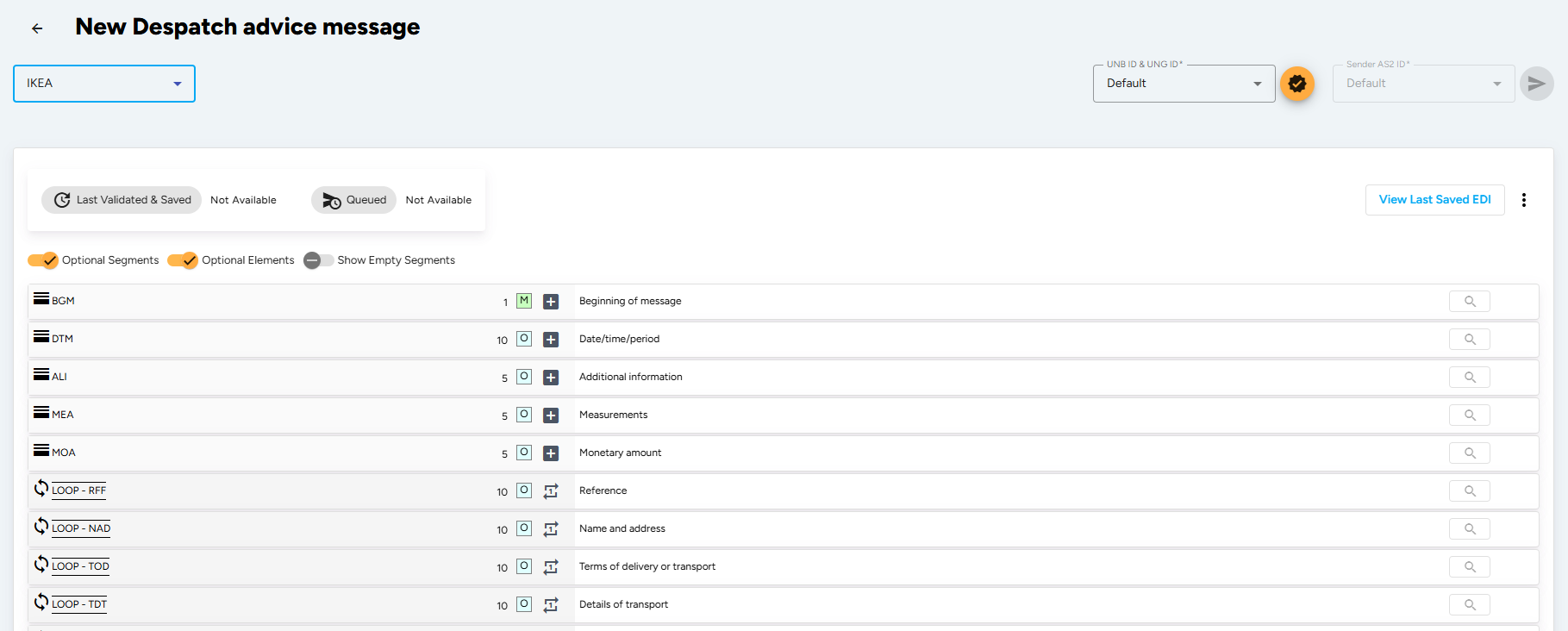
The UNA, UNB and UNH service segments are generated automatically by the EDI Generator from the partner profile you selected. You only fill in the segments described below, starting at BGM.
Enter Beginning Segment Details (BGM Segment)
The BGM segment indicates the type and function of the message and carries the despatch advice number. All references other than the document number go in the RFF segment.
- Document/message Name, Coded (BGM010-01): Enter
351(Despatch advice). Other options are345(Ready for despatch advice),748(Consignment despatch advice) and729(Returns advice). - Document/message Number (BGM020): Enter your unique despatch advice number.
- Message Function, Coded (BGM030): Enter
9(Original). Use1(Cancellation),4(Change),5(Replace) or7(Duplicate) as applicable — when cancelling or changing, the previous despatch advice number must be given in the RFF segment.
Enter Despatch and Delivery Dates (DTM Segment)
The DTM segment specifies the date of the Despatch Advice and any dates related to the delivery of the goods. Add one iteration per date. Identification of the document/message date (qualifier 137) is mandatory in every EANCOM message.
- Date/time/period Qualifier (DTM010-01):
137– Document/message date/time (mandatory).11– Despatch date and/or time.17– Delivery date/time, estimated.2– Delivery date/time, requested;63/64– latest / earliest delivery;358/359– scheduled for delivery on or after / on or before.
- Date/time/period (DTM010-02): Enter the date in the format CCYYMMDD.
- Date/time/period Format Qualifier (DTM010-03): Enter
102to specify the format you used as CCYYMMDD.
Enter Total Shipment Measurements (MEA Segment)
The header MEA segment specifies the physical measurements of the entire shipment. Enter this so the receiving warehouse can plan dock and handling capacity.
- Measurement Application Qualifier (MEA010): Enter
PD(Physical dimensions) orSO(Storage limitation). - Measurement Dimension, Coded (MEA020-01): Enter
G(Gross weight),ABJ(Volume) orTC(Temperature). - Measure Unit Qualifier (MEA030-01): Enter the unit, e.g.
KGM(kilogram). - Measurement Value (MEA030-02): Enter the value.
For a temperature-controlled shipment, use a range instead of a discrete value by filling Range Minimum (MEA030-03) and Range Maximum (MEA030-04), e.g.
MEA+SO+TC+CEL:-10'.
Enter Reference Information (RFF Loop)
The RFF loop provides references that apply to the whole transaction — most importantly the order the shipment fulfils. Each reference may be followed by its own DTM segment.
- Buyer’s Order Number (first iteration):
- Reference Qualifier (RFF010-01): Enter
ON(Order number - buyer). - Reference Number (RFF010-02): Enter the buyer’s PO number.
- DTM: Enter Date/time/period Qualifier (DTM010-01)
171(Reference date/time), the PO date and format102.
- Reference Qualifier (RFF010-01): Enter
- Order Response Number (add another iteration):
- Reference Qualifier (RFF010-01): Enter
POR(Purchase order response number). - Reference Number (RFF010-02): Enter the ORDRSP number you sent for this order.
- Reference Qualifier (RFF010-01): Enter
- Other useful qualifiers here are
AAJ(Delivery order number),AAU(Despatch note number),PK(Packing list number),CT(Contract number) andVN(Order number - supplier).
Define Party Identification (NAD Loop)
The NAD Loop identifies the trading partners involved in the Despatch Advice. Identification of the Supplier (SU) and Buyer (BY) is recommended; the Delivery Party (DP) and shipper should be added when different from the supplier or buyer.
Where a GLN is available, parties are identified in coded form only — the clear-text composites (Party Name (NAD040) through Country, Coded (NAD090)) are used only when a coded identification cannot be used.
- Supplier (SU):
- Party Qualifier (NAD010): Select
SU(Supplier). - Party Id. Identification (NAD020-01): Enter your 13-digit GLN.
- Code List Responsible Agency, Coded (NAD020-03): Select
9(GS1).
- Party Qualifier (NAD010): Select
- Buyer (BY): add another iteration with qualifier
BYand the buyer’s GLN. - Delivery Party (DP): add another iteration with qualifier
DPand the GLN of the receiving warehouse. This is the main delivery address for all line items. - Other qualifiers available are
DEQ(Shipper) andUC(Ultimate consignee).
Add Party References (RFF under NAD)
The RFF segment nested inside the NAD loop carries references belonging to that party only — typically the VAT registration number.
- Reference Qualifier (RFF010-01): Enter
VA(VAT registration number). - Reference Number (RFF010-02): Enter that party’s VAT registration number.
Other qualifiers available here are IA (Internal vendor number), IT (Internal customer number), GN (Government reference number) and AMT (Goods and Services Tax identification number).
Enter Terms of Delivery (TOD Loop)
The TOD segment specifies the terms of delivery for the despatch advice.
- Terms Of Delivery Or Transport Function, Coded (TOD010): Enter
2(Despatch condition) or3(Price and despatch condition). - Transport Charges Method Of Payment, Coded (TOD020): Enter
DF(Defined by buyer and supplier) orPC(Prepaid but charged to customer). - Terms Of Delivery Or Transport, Coded (TOD030-01): Enter the INCOTERM, e.g.
DDP,CIF,EXW. - Code List Qualifier (TOD030-02) / Code List Responsible Agency, Coded (TOD030-03): Enter
2Eand9when INCOTERMS are used.
Enter Transport Details (TDT Loop)
The TDT segment specifies the transport services used for the shipment.
- Transport Stage Qualifier (TDT010): Enter
20(Main-carriage transport). - Conveyance Reference Number (TDT020): Enter the reference number covering the transport.
- Mode Of Transport, Coded (TDT030-01): Enter the mode, e.g.
30(Road transport). - Type Of Means Of Transport Identification (TDT040-01): Enter
31(Truck) or23(Rail bulk car). Only used when a generic description such as road transport is unsuitable. - Carrier Identification (TDT050-01): Enter the carrier’s 13-digit GLN, with Code List Responsible Agency, Coded (TDT050-03) set to
9(GS1). - Id. Of The Means Of Transport (TDT080-04): Enter the vehicle licence plate or aircraft number if required.
Enter Equipment and Seal Details (EQD Loop)
The EQD loop provides information on the equipment used to transport the goods, and the seal applied to it. This is what allows the receiving warehouse to verify the load was not tampered with in transit.
- Equipment Details (EQD):
- Equipment Qualifier (EQD010): Enter
CN(Container),PA(Pallet),UL(ULD),BPN(Box pallet non exchangeable) orEFP(Exchangeable EUR flat pallet). - Equipment Identification Number (EQD020-01): Enter the container or trailer number.
- Full/empty Indicator, Coded (EQD060): Optional indicator of the load state.
- Equipment Qualifier (EQD010): Enter
- Seal Number (SEL):
- Seal Number (SEL010): Enter the seal number applied to the equipment.
- Sealing Party, Coded (SEL020-01): Enter
CA(Carrier),SH(Shipper) orCU(Customs).
Build the Packing Hierarchy (CPS Loop)
This is the core of the Despatch Advice. The CPS (Consignment packing sequence) segment defines a logical top-down packing structure: each CPS iteration is one level of the hierarchy, and it points at its parent.
- Hierarchical Id. Number (CPS010): Enter a sequential number, starting at
1. Sequential numbering is recommended. - Hierarchical Parent Id. (CPS020): Enter the Hierarchical Id. Number of the level this one sits inside. Leave empty for the top level.
- Packaging Level, Coded (CPS030): Optionally enter
1E(Highest) to explicitly flag the total shipment level, or5(Shipment level).
For our two-pallet shipment:
- CPS 1 — the shipment itself, no parent.
- CPS 2 — pallet 1, parent =
1. - CPS 3 — pallet 2, parent =
1.
Describing the hierarchy is not mandatory. The simplest valid DESADV uses a single “dummy”
CPS+1'followed directly by the LIN segments, giving only products and total quantities with no packing structure or SSCCs. Add levels only as deep as your partner requires.
Describe Each Package Level (PAC Segment)
The PAC segment identifies the total number of packages per hierarchical level identified in the CPS segment. It repeats within one CPS level — once for the pallet itself, once for the cartons it contains.
- Number Of Packages (PAC010): Enter the count at this level.
- Packaging Related Information, Coded (PAC020-02): Optionally flag how the package is marked, e.g.
52(Package barcoded UCC or EAN-128),51(Package barcoded ITF-14),78(Package bar-coded and EPC tagged). - Type Of Packages Identification (PAC030-01): Enter the package type, e.g.
201(Pallet ISO 1 - 1/1 EURO Pallet),CT(Carton),09(Returnable pallet). - Code List Responsible Agency, Coded (PAC030-03): Enter
9(GS1) when a GS1 package type code such as201is used. - Returnable Package Freight Payment Responsibility, Coded (PAC050-01): Only used where the packaging is returnable —
1(Paid by customer),2(Free),3(Paid by supplier).
Add Package Measurements (MEA Segment under PAC)
The MEA segment under PAC provides the measurements of that specific packaging unit. Add one iteration per dimension.
- Measurement Application Qualifier (MEA010): Enter
PD(Physical dimensions). - Measurement Dimension, Coded (MEA020-01): Enter
AAB(Unit gross weight),AAA(Unit net weight),WD(Width dimension),LN(Length dimension) orHT(Height dimension). - Measure Unit Qualifier (MEA030-01): Enter the unit, e.g.
KGM(kilogram) orMMT(millimetre). - Measurement Value (MEA030-02): Enter the value.
Identify Each Package with an SSCC (PCI and GIN Segments)
The PCI segment states how the package is marked, and the GIN segment beneath it carries the actual identification number. Every unit delivered should be uniquely identified — this is what lets the receiver scan a pallet on arrival and know exactly what is on it.
- Package Identification (PCI):
- Marking Instructions, Coded (PCI010): Enter
33E(Marked with Serial Shipping Container Code). Depending on the partner definition39may be used for the same purpose;47marks a GS1 Global Returnable Asset Identifier. - Shipping Marks (PCI020-01): Only used for human-readable marks printed on the package.
- Marking Instructions, Coded (PCI010): Enter
- Goods Identity Number (GIN):
- Identity Number Qualifier (GIN010): Enter
BJorAW(Serial shipping container code). Other options areBN(Serial number),BX(Batch number). - Identity Number (GIN020-01): Enter the 18-digit SSCC.
- Identity Number (GIN020-02): Enter a second SSCC to express a range, e.g.
GIN+BJ+354123450000000014:354123450000000106'. Further ranges go in GIN030 through GIN060.
- Identity Number Qualifier (GIN010): Enter
Within EANCOM it is recommended to use the SSCC for unique identification of individual transport packages. An SSCC is 18 digits and must never be reused within at least one year of the despatch date.
Add the Despatched Items (LIN Loop)
The LIN loop sits inside the CPS level that contains it — this is what says “these goods are on this pallet”. Line numbers run sequentially across the whole message, not restarting per pallet.
- Line Item (LIN):
- Line Item Number (LIN010): Enter a sequential line number starting at
1. - Item Number (LIN030-01): Enter the GTIN of the article being despatched. Where a GTIN exists, its use in LIN is mandatory.
- Item Number Type, Coded (LIN030-02): Enter
SRV(GS1 Global Trade Item Number).
- Line Item Number (LIN010): Enter a sequential line number starting at
- Additional Product Id (PIA Segment):
- Product Id. Function Qualifier (PIA010): Enter
1(Additional identification), or5when no GTIN was supplied in LIN. Use3(Substituted by) /4(Substituted for) when the despatched article differs from the one ordered. - Item Number (PIA020-01): Enter the buyer’s item number.
- Item Number Type, Coded (PIA020-02): Enter
IN(Buyer’s item number) orSA(Supplier’s article number). - Code List Responsible Agency, Coded (PIA020-04): Enter
92(Assigned by buyer) or91(Assigned by supplier).
- Product Id. Function Qualifier (PIA010): Enter
- Item Description (IMD Segment):
- Item Description Type, Coded (IMD010): Enter
F(Free-form) for clear text orC(Code) for a coded description. - Item Description (IMD030-04): Enter the product name in clear text.
- Item Description Type, Coded (IMD010): Enter
- Quantity (QTY Segment): add one iteration per quantity type.
- Quantity Qualifier (QTY010-01):
12– Despatch quantity (what is actually in the box).21– Ordered quantity — send this alongside12whenever the two differ, so the receiver can see the shortfall.59– Number of consumer units in the traded unit;61– Return quantity;121– Over shipped;192– Free goods quantity.
- Quantity (QTY010-02): Enter the quantity.
- Measure Unit Qualifier (QTY010-03): Only used if the product is of variable quantity, e.g.
KGM.
- Quantity Qualifier (QTY010-01):
- Additional Information (ALI Segment - Optional):
- Special Conditions, Coded (ALI030): Enter
165(Split shipment),164(Shipment completes order) or97(Promotional price). - Country Of Origin, Coded (ALI010): Enter the ISO 3166 two-alpha country code when required for customs.
- Special Conditions, Coded (ALI030): Enter
- Line Level References (RFF Loop): ties the despatched line back to the exact line on the buyer’s order.
- Reference Qualifier (RFF010-01): Enter
ON(Order number - buyer). - Reference Number (RFF010-02): Enter the buyer’s PO number.
- Line Number (RFF010-03): Enter the line number from the original order.
- Reference Qualifier (RFF010-01): Enter
Set Control Totals (CNT Segment)
The CNT segment provides message control information the receiver’s in-house system uses to check the message arrived complete.
- Control Qualifier (CNT010-01):
2– Number of line items in message (the total count ofLINsegments).1– Total value of the quantity segments at line level.11– Total number of packages (the sum of the Number Of Packages (PAC010) values).7/29– Total gross / net weight, summed from theAAB/AAAvalues in the MEA segments at line level.26– Total gross measurement/cube.
- Control Value (CNT010-02): Enter the relevant value depending on the qualifier.
The segments and element rules detailed above represent a sample IKEA DESADV specification scenario. Depending on your partner, the required qualifiers, loops, pattern validations, and mandatory elements can vary. The EDI Generator automatically aligns the editor form fields and validation rules to match whichever partner definition you select.
Validate, Save, and Send
- Once all details are filled, click the Validate and Save button in the top-right corner.
- The EDI Generator will check your document against the EDIFACT D96A syntax rules and the validation rules defined in the IKEA DESADV specification, including the CPS parent/child integrity, SSCC check digits, segment group cardinality, and the control totals in CNT.
- If there are validation errors, correct the pointed out segments and re-validate.
- Once the validation is successful, click Send to transmit the DESADV Despatch Advice to IKEA over AS2/SFTP.
Once the goods are despatched, the final step in the cycle is requesting payment. See Creating Invoices (EDI INVOIC) for instructions on the invoice.