
Creating Contract Status Messages (EDI IFTMCS)
The Instruction Contract Status (EDI IFTMCS) is a message sent by the party providing the transport or forwarding service to the party that issued the instructions, stating the actual details, terms and conditions of the service and of the consignment involved. It is also exchanged between carriers directly.
This guide walks you through creating an EDI IFTMCS in the EDI Generator using the IKEA IFTMCS definition.
Creating an EDI IFTMCS from Scratch
If you need to initiate a Contract Status message manually, follow these steps using our sample scenario.
Scenario Context
- Partner: IKEA
- Message Reference:
IFTMCS0045821 - Document Number:
IKEA20260818001, message function9(Original) - Bill of Lading:
250918442, carrier SCACMAEU→ referenceMAEU250918442 - Message Sender / Cargo Handling Agent:
NL33257174(2-alpha country code + Chamber of Commerce number) - Consignor: Ningbo Homeware Mfg Co Ltd, Ningbo CN — no EORI, so full address required
- Consignee (IKEA): EORI
NL006038996 - Notify Party 1: EORI
NL006038996, e-mailcustoms.nl@ikea.com - Warehouse Keeper: customs authority ID
NL9876543, warehouse licenceNLCW12345678 - Vessel: MAERSK KOWLOON, IMO
9321483, voyage634W, flagNL - Port of Loading:
CNSHA, actual departure2026-08-20 - Port of Discharge:
NLRTM, terminalRTMAPMII, ETA2026-09-14 - Place of Delivery: Älmhult
- Conditions of carriage: Pier-to-pier, freight prepaid
- Total Gross Weight:
10600KGM across 2 containers - Consignment structure: 2 goods items in 2 containers
- Goods item 1 — 420 cartons, HS
94036090,8450KG — split300cartons /6100KG into containerMSKU7231884and120cartons /2350KG intoTGHU4451209 - Goods item 2 — 180 cartons, HS
63023100,2150KG — all inTGHU4451209 - Container 1 —
MSKU7231884, ISO size/type45G1, tare3900KG, seal21876 - Container 2 —
TGHU4451209, ISO size/type22G1, tare2200KG, seal21877
- Goods item 1 — 420 cartons, HS
Start Contract Status Creation
- In the side menu, navigate to IFTMCS (or Outgoing Types > IFTMCS Instruction contract status message if nested).
- Click the Create button in the top-right corner.
- Select your partner (e.g., IKEA) from the dropdown.
- The EDI editor will load the structure for the IFTMCS document.
For a detailed guide on how the EDI Editor interface works (including how to add segment iterations, use Basic or Advanced loop modes, and locate validation errors), see Create New EDI File.
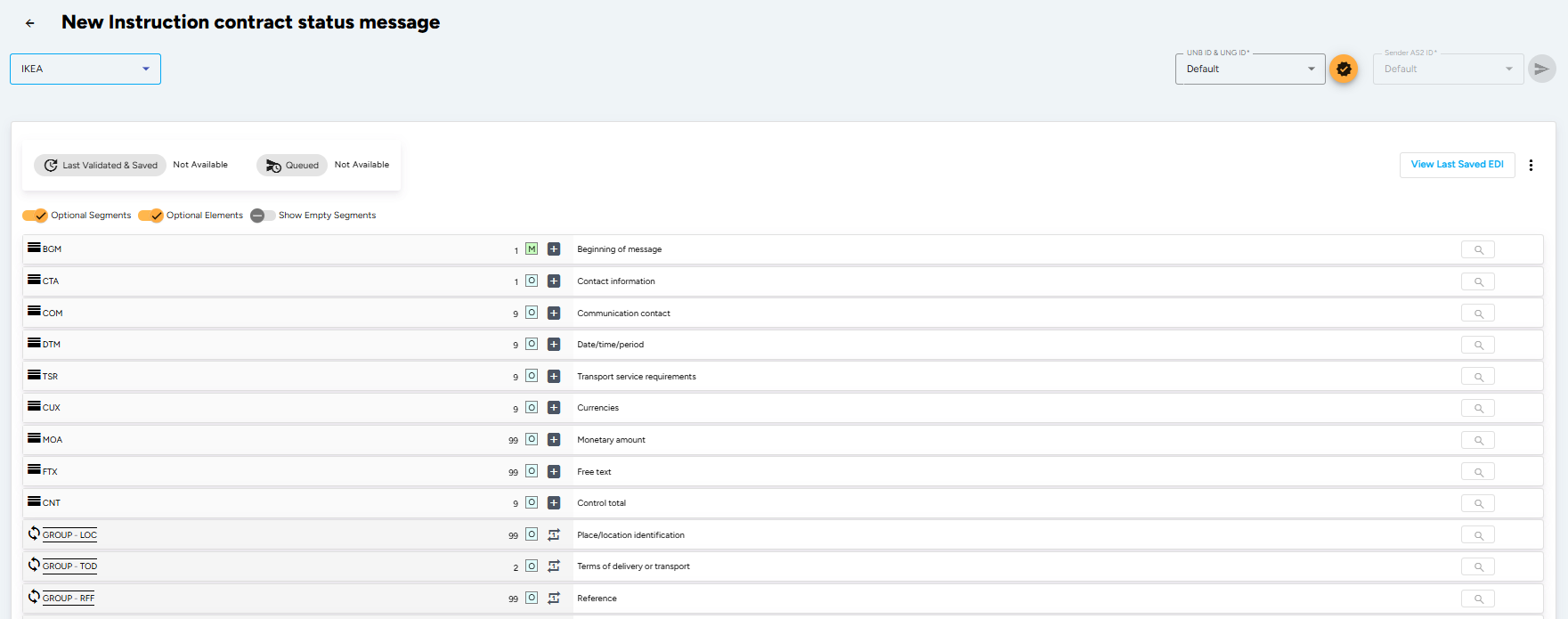
The UNA, UNB and UNH service segments are generated automatically by the EDI Generator from the partner profile you selected. You only fill in the segments described below, starting at BGM.
Enter Beginning Segment Details (BGM Segment)
The BGM segment indicates the type and function of the message and carries the message’s own unique reference. Note that this is not the bill of lading number — that goes in the RFF segment.
- Document/message Name, Coded (BGM010-01): Enter
707(Bill of lading copy). This is the only document name code the specification accepts. - Document/message Number (BGM020): Enter a unique reference determined by you, the sender. A repeated value causes error
112(“Duplicate reference”) in the APERAK response. - Message Function, Coded (BGM030): Enter
9(Original). Use1(Cancellation) or5(Replace) as applicable — when cancelling or replacing, the reference of the previous message must be given in an RFF+ACW segment.
Enter Conditions of Carriage (TSR Segment)
The TSR segment states the contractual condition for the transport, indicating how much of the door-to-door movement the carrier is responsible for.
- Contract And Carriage Condition, Coded (TSR010-01):
27– Door-to-door (carrier covers pre-carriage, main carriage and on-carriage).28– Door-to-pier (pre-carriage included, on-carriage excluded).29– Pier-to-door (on-carriage included, pre-carriage excluded).30– Pier-to-pier (carrier responsible for the main carriage only).
- Service Requirement, Coded (TSR020-01): Enter
0(no part shipment) or1(part shipment). Defaults to0when omitted.
Enter Filing Type (FTX Segment)
The header-level FTX segment tells the receiving system what kind of declaration to file downstream. It is optional, but if you need to suppress a declaration you must send it explicitly.
- Text Subject Qualifier (FTX010): Enter the filing type subject qualifier.
- Text Function, Coded (FTX020): Enter
TSR(Temporary Storage Declaration Reuse) orNON(no declaration sent to customs).
Set Consignment Control Totals (CNT Segment)
The CNT segment carries totals for the whole consignment. Add one iteration per total.
- Control Qualifier (CNT010-01):
7– Total gross weight of the consignment.16– Total number of equipment (containers) in the message.
- Control Value (CNT010-02): Enter the total. For weight, three decimals are allowed.
- Measure Unit Qualifier (CNT010-03): Enter
KGM(kilogram) for the weight total. Leave empty for the equipment count.
Identify Consignment Locations (LOC Loop — Segment Group 1)
The header LOC loop identifies locations that apply to the entire message. Add one iteration per location. Each occurrence uses a different qualifier and none of them is individually mandatory.
- Place/location Qualifier (LOC010):
7– Place of delivery (where the carrier’s responsibility ends).88– Place of acceptance (where the goods were actually received).91– Place of document issue.
- Place/location (LOC020-04): Enter the location in clear text.
Enter Terms of Delivery (TOD Loop — Segment Group 2)
The TOD segment specifies who pays the freight.
- Transport Charges Method Of Payment, Coded (TOD020):
PO– Prepaid only.CC– Collect (freight paid by the consignee).MX– Mixed (partially collect, partially prepaid).PE– Payable elsewhere (place of payment unknown at start of conveyance).NC– Service freight, no charge.
Enter Consignment References (RFF Loop — Segment Group 3)
The RFF loop provides references applying to the whole message. The bill of lading reference is the single most important field in the message — it is the key customs uses to identify the consignment.
- Transport Document Number (mandatory):
- Reference Qualifier (RFF010-01): Enter
BM(Bill of lading number). - Reference Number (RFF010-02): Enter the SCAC code followed by the B/L number, with no separator. The SCAC must be identical to the carrier identifier you enter in TDT050-01. All alphabetical characters must be upper case. A missing B/L reference causes error
1in APERAK.
- Reference Qualifier (RFF010-01): Enter
- Warehouse Licence (conditional):
- Reference Qualifier (RFF010-01): Enter
ANJ(Authorization number). - Reference Number (RFF010-02): Enter the licence of the warehouse where the goods will be stored. Missing causes error
507; invalid causes errorE02.
- Reference Qualifier (RFF010-01): Enter
- Movement Reference Number (conditional, repeatable up to 95 times):
- Reference Qualifier (RFF010-01): Enter
MRN. - Reference Number (RFF010-02): Enter the movement reference number.
- Reference Version Number (RFF010-04): Enter the ENS transport document type —
704(negotiable consignment) or705(non-negotiable / straight consignment).
- Reference Qualifier (RFF010-01): Enter
- Previous Message (only for change or cancellation):
- Reference Qualifier (RFF010-01): Enter
ACW(Reference number to previous message). - Reference Number (RFF010-02): Enter the BGM020 value of the message being replaced or cancelled. An unmatched value causes error
317.
- Reference Qualifier (RFF010-01): Enter
Enter Customs Status (GOR Loop — Segment Group 4)
The GOR segment carries the customs status and process code of the goods. It is conditional — omit it entirely for straightforward non-Community imports like our scenario. When you do use it, at least one of the two Government Action composites must be filled.
- Government Procedure, Coded (GOR020-04) — customs status:
C– Goods transported as EU Community goods.T/T1/T2– EU Customs procedure T, T1 or T2.T2F– T2F procedure between a special fiscal territory and other customs territory.N27– EU community goods in transhipment.NP– EU empty return packaging.TV– Goods from EFTA countries.
- Government Procedure, Coded (GOR030-04) — customs process code, mandatory when the first composite is empty:
27– Sea-in/sea-out.302– Military goods.
Enter Transport Details (TDT Loop — Segment Group 8)
The TDT segment identifies the vessel and voyage of the main carriage. Every element here is validated.
- Transport Stage Qualifier (TDT010): Enter
20(Main-carriage transport). - Conveyance Reference Number (TDT020): Enter the voyage number of the seagoing vessel. Missing causes error
2. - Mode Of Transport, Coded (TDT030-01): Enter
1(Maritime transport). Invalid causes error321. - Carrier Identification (TDT050-01): Enter the carrier’s SCAC code. Missing causes error
3; invalid causes error4. This value must match the SCAC prefix used in RFF+BM. - Carrier Name (TDT050-04): Enter the shipping line name. Not stored — it is reference data.
- Id. Of Means Of Transport Identification (TDT080-01): Enter the final seven characters of the vessel’s IMO number. Missing causes error
341; invalid causes error340. - Id. Of The Means Of Transport (TDT080-04): Enter the vessel name.
- Nationality Of Means Of Transport, Coded (TDT080-05): Enter the vessel flag code.
Enter Ports and Dates (LOC/DTM Loop — Segment Group 9)
Nested inside the TDT group, the LOC loop identifies the ports on this leg of transport, each optionally followed by its own DTM. Add one iteration per port.
- Discharge Location (required):
- Place/location Qualifier (LOC010): Enter
11(Place/port of discharge). - Place/location Identification (LOC020-01): Enter the UN/LOCODE of the discharge port — not the transhipment port. Missing causes error
5; an invalid UN/LOCODE causes error6. - Related Place/location One Identification (LOC030-01): Enter the discharge terminal code. This is required and validated when the port of discharge equals the vessel’s port of call; otherwise it is optional and ignored. Missing or invalid causes error
358. - DTM: Enter Date/time/period Qualifier (DTM010-01)
132(Estimated arrival), the ETA, and format102(CCYYMMDD). Missing or a date before 1970 causes error410.
- Place/location Qualifier (LOC010): Enter
- Port of Loading:
- Place/location Qualifier (LOC010): Enter
9(Place/port of loading), with the UN/LOCODE in LOC020-01. - DTM: Enter qualifier
186(Actual departure date), the departure date, and format102.
- Place/location Qualifier (LOC010): Enter
- Other qualifiers available here are
170(Final port of discharge) and82(Pre-carriage port).
Define Party Identification (NAD Loop — Segment Group 11)
The NAD loop identifies every party to the consignment. Each party gets its own iteration of the group.
The identification rule differs by party type. The message sender (MS) and cargo handling agent (CG) are identified by a 2-alpha ISO country code followed by the organisation’s Chamber of Commerce number, e.g. NL11223344556. The commercial parties — consignor (CZ), consignee (CN) and notify parties (N1, N2) — are identified by EORI number where one exists.
- Message Sender (MS) — required:
- Party Qualifier (NAD010): Select
MS(Document/message issuer/sender). - Party Id. Identification (NAD020-01): Enter the sender’s country code + CoC number. Missing causes error
20; invalid causes error21.
- Party Qualifier (NAD010): Select
- Cargo Handling Agent (CG) — required:
- Party Qualifier (NAD010): Select
CG(Carrier’s agent). Same identification format asMS. Missing causes error22; invalid causes error23.
- Party Qualifier (NAD010): Select
- Consignor (CZ):
- Party Id. Identification (NAD020-01): Enter the EORI number if known.
- If the EORI number is supplied, all name and address elements are optional.
- If the EORI number is not supplied, the full address becomes mandatory: Party Name (NAD040-01), Street And Number/p.o. Box (NAD050-01), City Name (NAD060), Postcode Identification (NAD080) and Country, Coded (NAD090). Any missing element causes error
24; an invalid country code causes errorC30.
- Consignee (CN): same rules as the consignor.
- Notify Party 1 (N1): same address rules. N1 is mandatory when the B/L is “to order” — that is, when the consignee’s party identifier is
10600. Omitting it in that case causes error26. - Warehouse Keeper (WH): enter the customs authority ID of the warehouse keeper in NAD020-01. Missing causes error
508. Requires a matching RFF+ANJ. - Connecting Carrier (CH) and Notify Party 2 (N2) are available as further iterations.
Add Party Contacts (CTA and COM Segments — Segment Group 12)
Nested inside the NAD loop, CTA names a contact and COM carries their communication details.
- Contact Function, Coded (CTA010): Enter
IC(Information contact). - Department Or Employee (CTA020-02): Enter the contact’s name.
- Communication Number (COM010-01): Enter the address or number.
- Communication Channel Qualifier (COM010-02): Enter
EM(Electronic mail),TE(Telephone) orFX(Fax).
Add the Goods Items (GID Loop — Segment Group 18)
The GID loop describes what is being shipped. Add one iteration per commodity. Goods item numbers must be unique within the consignment and are the handle every other message refers back to.
- Goods Item Details (GID):
- Goods Item Number (GID010): Enter a sequential number starting at
1. A duplicate causes error250. - Number Of Packages (GID020-01): Enter the count of outer packages. Missing causes error
251. - Type Of Packages Identification (GID020-02): Enter the 2-alpha package type from UN Recommendation No. 21 Annex V, e.g.
CT(Carton),PK(Package),BX(Box). UseCN(Container) for empty containers. Invalid or missing causes error228. - Number Of Packages (GID030-01) and Type Of Packages Identification (GID030-02): Only fill these inner package elements when the customs-required level of packaging differs from the outer level. Leave empty for bulk cargo and empty containers.
- Goods Item Number (GID010): Enter a sequential number starting at
- Commodity Code (PIA Segment) — mandatory:
- Product Id. Function Qualifier (PIA010): Enter
5(Product identification). - Item Number (PIA020-01): Enter the HS code. As of version 5.8.9 the HS code is mandatory and must be at least 6 and at most 8 digits. It is validated against the Commodity Type table on the full code first, then on the first 4 positions; failing both causes error
255. - Item Number Type, Coded (PIA020-02): Enter
HS(Harmonised system).
- Product Id. Function Qualifier (PIA010): Enter
- Goods Description (FTX Segment):
- Text Subject Qualifier (FTX010): Enter
AAA(Goods description). - Free Text (FTX040-01): Enter a plain-language description of the goods, sufficient to identify them for customs purposes. Missing causes error
252.
- Text Subject Qualifier (FTX010): Enter
- Gross Weight (MEA Segment — Segment Group 20) — mandatory:
- Measurement Application Qualifier (MEA010): Enter
AAE(Measurement). - Measurement Dimension, Coded (MEA020-01): Enter
G(Gross weight). - Measure Unit Qualifier (MEA030-01): Enter
KGM. Missing or incorrect causes error253. - Measurement Value (MEA030-02): Enter the gross weight including packaging. Three decimals are allowed. Value
0is permitted only for empty containers.
- Measurement Application Qualifier (MEA010): Enter
- Marks and Labels (PCI Segment — Segment Group 23): repeatable up to 15 times.
- Shipping Marks (PCI020-01) through (PCI020-10): Enter the marks and numbers as they physically appear on the packages, one line per component.
Place the Goods in Containers (SGP Loop — Segment Group 27)
The SGP segment is what connects the goods side of the message to the equipment side. Add one iteration per container that carries part of this goods item — this is how a single commodity split across two boxes is expressed.
- Split Goods Placement (SGP):
- Equipment Identification Number (SGP010-01): Enter the container number as prefix + serial with no spaces, e.g.
MSKU7231884. This must match an EQD020-01 value later in the message. - Number Of Packages (SGP020): Enter how many outer packages of this goods item are in this container. When omitted the stored value remains
0.
- Equipment Identification Number (SGP010-01): Enter the container number as prefix + serial with no spaces, e.g.
- Item Gross Weight (MEA Segment — Segment Group 28):
- Measurement Application Qualifier (MEA010): Enter
WT(Weights). - Measurement Dimension, Coded (MEA020-01): Enter
AAE(Item gross weight). - Measure Unit Qualifier (MEA030-01) / Measurement Value (MEA030-02): Enter
KGMand the weight of the portion in this container.
- Measurement Application Qualifier (MEA010): Enter
Describe the Equipment (EQD Loop — Segment Group 36)
The EQD loop describes each container once, at the end of the message. Add one iteration per container.
- Equipment Details (EQD):
- Equipment Qualifier (EQD010): Enter
CN(Container),TE(Trailer),SW(Swap body) orCH(Chassis).CHalso covers trucks and truck-trailer combinations. - Equipment Identification Number (EQD020-01): Enter the container number, prefix + serial, no spaces.
- Equipment Size And Type Identification (EQD030-01): Enter the 4-character ISO size/type code. For non-container equipment use the fixed substitutes:
99U9forTE,99U8forSW,99U7forCH. An incorrect code causes error601. - Equipment Supplier, Coded (EQD040): Enter
1(Shipper supplied) or2(Carrier supplied). - Full/empty Indicator, Coded (EQD060): Enter
4(Empty) or5(Full).
- Equipment Qualifier (EQD010): Enter
- Tare Weight (MEA Segment):
- Measurement Application Qualifier (MEA010): Enter
AAE(Measurement). - Measurement Dimension, Coded (MEA020-01): Enter
T(Tare weight). - Measure Unit Qualifier (MEA030-01) / Measurement Value (MEA030-02): Enter
KGMand the tare weight.
- Measurement Application Qualifier (MEA010): Enter
- Seal Number (SEL Segment):
- Seal Number (SEL010): Enter the seal number attached to the container.
- Sealing Party, Coded (SEL020-01): Enter
AB(Unknown) — the only value the specification accepts here. The receiving system always stores the value as the carrier seal.
- Container Operator (NAD Segment — Segment Group 38):
- Party Qualifier (NAD010): Enter
CF(Container operator/lessee). - Party Id. Identification (NAD020-01): Enter the operator’s 4-character code. Invalid causes error
369. - Code List Responsible Agency, Coded (NAD020-03): Enter
182(SCAC) or306(SMDG). When left empty,182is assumed.
- Party Qualifier (NAD010): Enter
The segments and element rules detailed above represent a sample IKEA IFTMCS cargo declaration scenario against specification M0335890 v5.8.9. Depending on your partner, the required qualifiers, loops, pattern validations, and mandatory elements can vary. The EDI Generator automatically aligns the editor form fields and validation rules to match whichever partner definition you select.
Validate, Save, and Send
- Once all details are filled, click the Validate and Save button in the top-right corner.
- The EDI Generator will check your document against the EDIFACT syntax rules and the validation rules defined in the IKEA IFTMCS specification, including SCAC consistency between RFF and TDT, HS code length and table membership, UN/LOCODE validity, the SGP-to-EQD container cross-references, and the RFF+ANJ / NAD+WH dependency pair.
- If there are validation errors, correct the pointed out segments and re-validate.
- Once the validation is successful, click Send to transmit the IFTMCS to IKEA over AS2/SFTP.
- Watch for the APERAK response. The specification maps almost every rule to a numbered APERAK error — the error numbers quoted throughout this guide are what you will see returned if a field is wrong.