
How to Use This Guide
This guide lists the validation and processing errors EDI Generator can report, what causes each one, and how to resolve it. The fastest route is to copy the exact error text from your Inbox, Outbox, or the document editor and search this page for it.
Where to find the error
- Incoming files: open the message in the Inbox. The status column shows the outcome, and the message view shows the full error text and the raw EDI payload.
- Outgoing documents: validation errors appear in the EDI create/edit view. Delivery failures appear in the Outbox.
Understanding an EDI Transaction/Message
If you are not familiar with EDI formats, EDI messages can look like random strings of code. Here is how it works using simple everyday mail analogies:
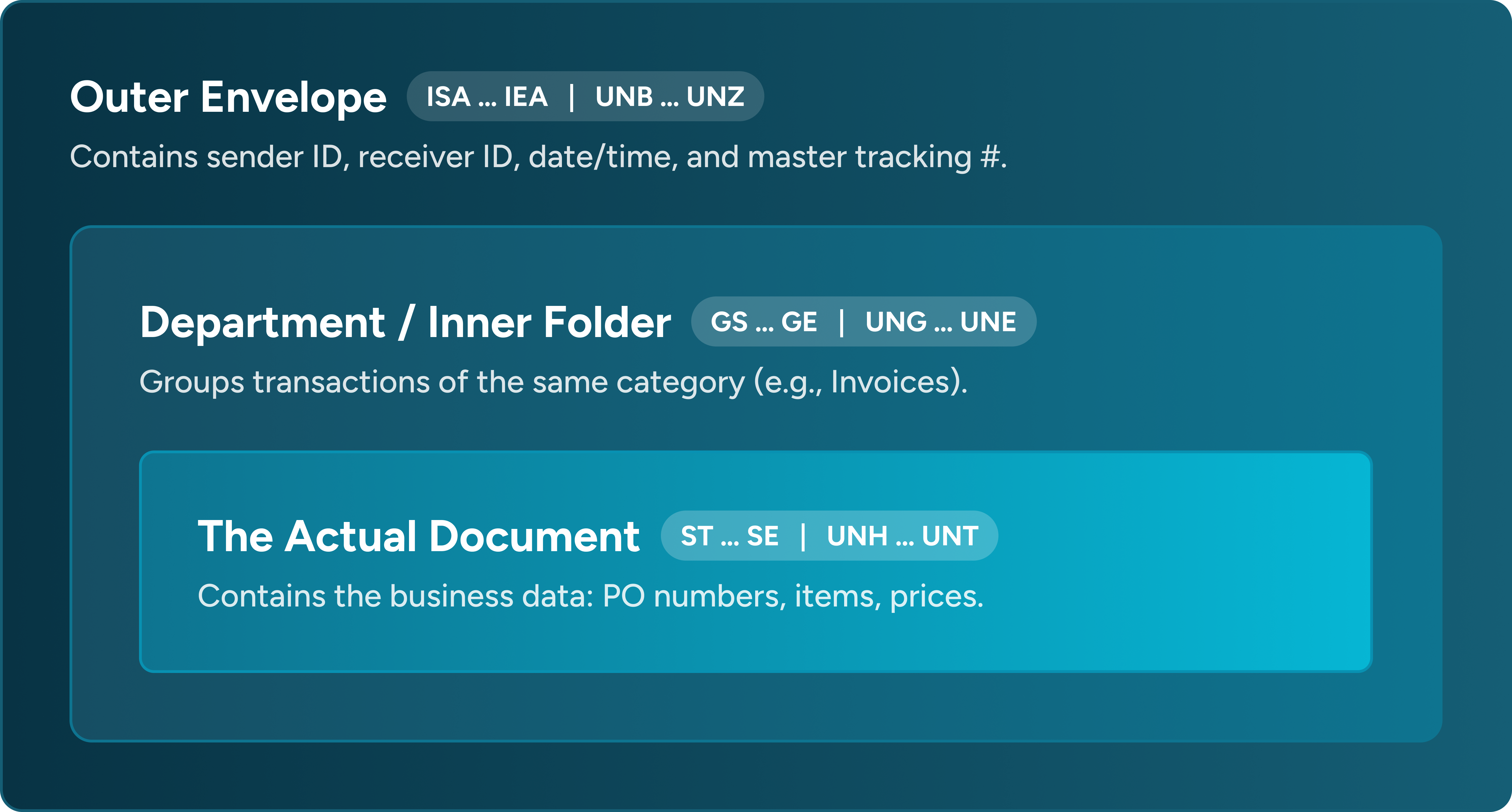
- Envelopes (
ISA/IEAin X12,UNB/UNZin EDIFACT): Just like a physical postal envelope. It has a Return Address (Sender ID), Delivery Address (Receiver ID), and a Tracking Number (Control Number). If the addresses don’t match your system settings, the message is rejected at this level. - Segments & Elements:
- A Segment is like a row on a form (e.g.,
BIG*20260923*PO-1001~). Segments end with a special terminator (usually~in X12 or'in EDIFACT). - An Element is an individual field on that row (e.g.
PO-1001). Elements are separated by a delimiter (usually*in X12 or+in EDIFACT).
- A Segment is like a row on a form (e.g.,
- Functional Acknowledgment (FA / 997 / CONTRL): A digital return receipt.
- When you receive a file: Your system automatically replies to tell the partner whether the document inside was syntactically valid (Accepted) or had syntax/schema errors (Rejected).
- When you send a file: Your partner’s system sends an FA back to tell you if they successfully accepted or rejected your document.
Incoming Errors (Files Received from Trading Partners)
When an incoming file arrives, the Status column in the Inbox immediately indicates the outcome of envelope parsing and schema validation.
| Inbox Status | When it Happens |
|---|---|
Pending | The EDI entry has been received and is awaiting processing. |
Completed | Processed successfully. |
Rejected | Organization ID mismatch; content/schema validation failure. |
Error | Envelope/structure errors, unknown partner, unknown document type, FA generation failure. |
Newlines and Line Breaks (CR/LF Guide)
One of the most frequent causes of validation failures is how line breaks are handled in incoming EDI files.
The Setting: “Preserve CR/LF Characters”
In EDI Generator, go to: Account settings > Organization > Processing > “Preserve CR/LF characters (newlines) in incoming files”
- When turned OFF (Default): EDI Generator automatically strips out all line breaks (
\rand\n) when an incoming file arrives, treating it as clean, continuous text. - When turned ON: EDI Generator keeps all line breaks intact in the raw payload. This is required whenever a trading partner uses the newline as their segment separator.
Partner uses only newlines as the segment separator (No ~ or ') and Preserve CR/LF feature is turned off
The trading partner did not use a symbol like ~ or ' at the end of each row. Instead, they pressed the Enter key (newline) to end every segment.
- Symptom / Error in Inbox:
- X12:
ISA/IEA or segment mismatch for separator: ... - EDIFACT:
UNB/UNZ or segment mismatch for separator: ...
- X12:
Because Preserve CR/LF was turned OFF, EDI Generator strips out all carriage returns and line feeds (\r and \n) immediately upon ingestion to sanitize the file. The entire file collapsed into one single unbroken line of text. The parser could not find where one segment ended and the next began.
So any one of your partners are using new line as the segment separator you will have to keep this option turned on. EDI generator specifically watches for this exact case, if you configure a partner with Newline as the segment separator in Partner Settings, the system detects this and automatically alerts you with a prompt to turn ON the organization setting if it is currently disabled.
Partner uses symbol + newline (e.g., ~ or ' + new line) and Preserve CR/LF feature is turned on
The partner placed a standard terminator (~ in X12 or ' in EDIFACT) and a new line at the end of every row.
- Symptom / Error in Inbox:
- X12:
ISA/IEA or segment mismatch for separator: ~ - EDIFACT:
UNB/UNZ count error or mismatchor errors failing to recognize message tags (likeUNH)
- X12:
Because Preserve CR/LF was turned ON, EDIG kept all line breaks in the raw file instead of stripping them. When EDI Generator detects the primary symbol (~ or ') and splits the file, the line breaks don’t disappear, they remain attached to the beginning of every subsequent segment (e.g., \r\nGS, \r\nST, \r\nIEA).
When EDI Generator checks the interchange trailer to verify that the last segment starts with IEA, the check fails because \r\nIEA does not start with IEA. EDI Generator assumes the envelope is invalid and throws a error.
Partner Identification & Organization Mismatches
Incoming file is addressed to an unknown Organization ID (Receiver Mismatch)
The file arrived at your system, but the Receiver ID specified on the envelope does not match any of your registered Organization identifiers.
- Symptom / Error in Inbox:
- X12:
Document does not match your organization ISA/GS identifiers - EDIFACT:
Document does not match your organization UNB/UNG identifiers
- X12:
When a file arrives, EDI Generator inspects the receiver envelope fields:
- In X12: Receiver ID Qualifier (
ISA07), Receiver ID (ISA08), and Receiver Code (GS03). - In EDIFACT: Recipient ID (
UNB03-01), Recipient ID Qualifier (UNB03-02) and if a UNG group header is present, Recipient Code (UNG03-01).
EDI Generator compares these against your registered identifiers in Account Settings > Organization > EDI Identification. If none match (and “Skip ISA/GS and UNB/UNG validation” is not enabled), EDI Generator immediately marks the message as REJECTED, flags this error, and automatically sends a negative Functional Acknowledgment (997 / CONTRL) back to the sender.
- What to check:
- Check the raw file header in your Inbox to see what receiver ID the partner sent.
- Either add that identifier under your Organization > EDI Identifiers (if it belongs to your company), or ask the partner to correct the receiver ID in their outbound system.
Sender does not match any configured Trading Partner (Sender Mismatch)
Your organization receiver ID was recognized, but EDI Generator cannot find a configured Trading Partner in your system matching the sender’s credentials.
- Symptom / Error in Inbox:
- X12:
Unable to locate <AS2|SFTP> partner with ID: <partnerID> and ISA: <qual>/<id> GS: <code> - EDIFACT:
Unable to locate <AS2|SFTP> partner with ID: <partnerID> and UNB: <qual>/<id> UNG: <code>
- X12:
After validating the receiver, EDI Generator looks up your Partner Directory to route the document. It matches on:
- The identifier (
<partnerID>- e.g., the partner’s AS2 ID or SFTP username). - The sender envelope fields: * In X12: Sender Qualifier (
ISA05), Sender ID (ISA06), and Sender Code (GS02). * In EDIFACT: Sender ID (UNB02-01), Sender Qualifier (UNB02-02) and if a UNG group header is present, Application Sender Identification (UNG02-01)
If no partner profile matches all of these credentials, EDI Generator stops processing and marks the message as ERROR, because it cannot determine which partner configuration and EDI transaction definitions to apply.
- What to check:
- Ensure a profile exists for this partner under Partners.
- Check the partner’s EDI Identifiers settings and verify that their AS2 ID / SFTP Username, along with their envelope identifiers (ISA Qualifier/Identifier and GS Code for X12, or UNB Qualifier/Identifier and UNG Code for EDIFACT), exactly match the values shown in the error message.
Envelope & Structural Errors
Any of the errors in this section will cause EDI Generator to halt processing and mark the Inbox message as ERROR (not Rejected). Use the Error status filter in the Inbox to find them. When more than one envelope problem is found, EDI Generator reports only the first and appends a count, e.g. ISA size mismatch at ISA #1 (1 of 3 errors): expected 105, found 104. Fixing the reported issue may reveal further ones.
File is empty, corrupt, or not an EDI document
The incoming payload does not start with an interchange header or is too short to be a valid EDI transmission.
- Symptom / Error in Inbox:
- X12:
Payload not EDI X12. No start ISA segment or payload too small - EDIFACT:
Payload not EDIFACT. No start UNA or UNB segment
- X12:
- X12: EDI generator checks that the file begins with
ISAand contains at least 123 characters (106-characterISAheader plus anIEAtrailer). If either condition is not met, this error is thrown. EDIFACT: EDI Generator verifies that the file begins with either
UNA(Service String Advice) orUNB(Interchange Header). If neither is found, processing halts immediately.- What to check:
- View raw EDI of the Inbox message to inspect the payload.
Interchange header has an invalid character size or element count
The opening interchange header does not conform to the fixed width or element count requirements.
- Symptom / Error in Inbox:
- X12 (Size):
ISA size mismatch at ISA #1: expected 105, found <actual> - X12 (Elements):
ISA element count mismatch at ISA #1: expected 17, found <actual> - EDIFACT (Elements):
UNB element count mismatch at UNB #1: expected >=6, found <actual>
- X12 (Size):
- X12: An
ISAsegment (excluding the terminator) must be strictly 105 characters long and contain exactly 16 data elements (17 parts including theISAtag). Senders commonly violate this by omitting space padding on sender/receiver IDs (ISA06/ISA08must be 15 characters), omitting 9-digit zero-padding onISA13, or accidentally inserting an extra delimiter (*). EDIFACT: A
UNBsegment must contain at least 5 data elements (UNB01 through UNB05), i.e. 6 parts including the UNB tag. If fewer elements are present, the header is incomplete.- What to check:
- View raw EDI of the Inbox message to inspect the payload.
- For X12: Check that
ISA06andISA08are padded with trailing spaces to 15 characters,ISA13has 9 digits, and exactly 16 asterisks separate the data fields. - For EDIFACT: Ensure all mandatory elements through
UNB05(Interchange Control Reference) are populated.
Interchange Control Number mismatch between Header and Trailer
The tracking number declared in the opening interchange header does not match the closing trailer.
- Symptom / Error in Inbox:
- X12:
Interchange control # mismatch at IEA #1: expected <ISA13>, found <IEA02> - EDIFACT:
Interchange control ref mismatch at UNZ #1: expected <UNB05>, found <UNZ02>
- X12:
- X12: EDI Generator compares the control number in
ISA13with the number inIEA02. EDIFACT: EDI Generator compares the control reference in
UNB05with the reference inUNZ02. If they differ, EDI Generator rejects the envelope because the header and trailer belong to mismatched interchanges.- What to check:
- Compare the header and trailer control numbers in the EDI payload.
Functional Group Control Number mismatch between Header and Trailer
The control number declared in the opening functional group header does not match the closing group trailer.
- Symptom / Error in Inbox:
- X12:
Group control # mismatch at GE #1: expected <GS06>, found <GE02> - EDIFACT:
Group reference # mismatch at UNE #1: expected <UNG05>, found <UNE02>
- X12:
- X12: Field
GS06(Group Control Number) must be mirrored exactly inGE02. EDIFACT: Field
UNG05(Group Reference Number) must be mirrored exactly inUNE02.- What to check:
- Open the EDI payload and compare
GS06againstGE02(X12) orUNG05againstUNE02(EDIFACT).
- Open the EDI payload and compare
Transaction / Message Control Reference mismatch
The control number on an individual document/message start tag does not match its ending trailer tag.
- Symptom / Error in Inbox:
- X12:
Txn control # mismatch at SE #1: expected <ST02>, found <SE02> - EDIFACT:
Message reference # mismatch at UNT #1: expected <UNH01>, found <UNT02>
- X12:
- X12: Inside each transaction,
ST02(Transaction Set Control Number) must matchSE02. EDIFACT: Inside each message,
UNH01(Message Reference Number) must matchUNT02. If a sender’s system sends mismatched control numbers on individual transactions inside a batch, EDIG flags the specific transaction sequence number.- What to check:
- Inspect the
ST/SEpair (X12) orUNH/UNTpair (EDIFACT) cited in the error message to see the mismatched values.
- Inspect the
Trailer declared count mismatch (Group, Transaction, or Message totals)
The total document or group count declared inside an envelope trailer does not match the actual number of items found in the file.
- Symptom / Error in Inbox:
- Interchange Trailer Count:
- X12:
Functional group count mismatch at IEA #1: expected <IEA01>, found <actual> - EDIFACT:
Group count mismatch at UNZ #1: expected <UNZ01>, found <actual>ORMessage count mismatch at UNZ #1: expected <UNZ01>, found <actual>
- X12:
- Functional Group Trailer Count:
- X12:
Txn set count mismatch at GE #1: expected <GE01>, found <actual> - EDIFACT:
Message count mismatch at UNE #1: expected <UNE01>, found <actual>
- X12:
- Interchange Trailer Count:
- In X12:
- The closing interchange trailer (
IEA01) declares how many functional groups (GSsegments) are in the file. If that declared number does not equal the real count of groups found, EDI Generator flags a Functional group count mismatch. - The closing group trailer (
GE01) declares how many transaction sets (STsegments) are in that group. If that number does not equal the real count of transactions found, EDI Generator flags a Txn set count mismatch.
- The closing interchange trailer (
- In EDIFACT:
- The closing interchange trailer (
UNZ01) declares the total count of functional groups (ifUNGis used) or total messages (if no groups are used). If that declared number does not match what was actually received, EDI Generator flags aUNZcount mismatch. - The closing group trailer (
UNE01) declares how many messages (UNHsegments) are inside that functional group. If that declared number does not match the real count, EDI Generator flags aUNEcount mismatch.
- The closing interchange trailer (
- What to check:
- Inspect the EDI payload to see if transactions or groups were truncated during transmission.
- If the file is complete, the partner’s EDI software miscalculated the declared count in their trailers.
Mixed transaction or message types in a single interchange or group
A sender bundled multiple different document types into the same functional group or interchange.
- Symptom / Error in Inbox:
- X12:
Txn set ID mismatch at ST #<n>: expected <ST01>, found <actual> - EDIFACT:
Message type ID mismatch at UNH #<n>: expected <UNH02>, found <actual>
- X12:
- In X12: Standard X12 rules require that every transaction inside a functional group must share the same document type. EDI Generator sets the expected document type using the very first
STsegment (e.g.850). If any subsequent transaction in that group has a different ID (e.g. an810), EDI Generator flags a mismatch. In EDIFACT: All messages within the interchange must share the exact same message type definition (e.g., all
ORDERS:D:96A:UN). If a subsequentUNHsegment introduces a different message type, EDI Generator rejects it.- What to check:
- Ask the partner’s EDI team to batch different document types (e.g. Invoices vs Purchase Orders) into separate functional groups or interchanges.
Unmatched opening and closing tag counts (Missing Trailers)
The file contains an opening header without a corresponding closing trailer tag (or an extra trailer was accidentally added).
- Symptom / Error in Inbox:
- X12:
ST/SE count mismatch at SE #1: expected <STCount>, found <SECount>GS/GE count mismatch at GE #1: expected <GSCount>, found <GECount>ISA/IEA count mismatch at IEA #1: expected <ISACount>, found <IEACount>
- EDIFACT:
UNH/UNT count mismatch at UNT #1: expected <UNHCount>, found <UNTCount>UNG/UNE count mismatch at UNE #1: expected <UNGCount>, found <UNECount>UNB/UNZ count mismatch at UNZ #1: expected <UNBCount>, found <UNZCount>
- X12:
Every opening tag must have an exact matching closing tag. For example, if a transmission contains three ST transaction headers, it must also have three SE transaction trailers. If an opening tag was never closed, or if a trailer was dropped during transmission, EDI Generator flags an unmatched count error.
- What to check:
- Check every transaction header (
ST/UNH) has its matching trailer (SE/UNT). - Check that no closing trailers were accidentally dropped or truncated at the end of the file.
- Check every transaction header (
Envelope segment element count or minimum size violations
Envelope control segments are malformed, missing fields, or contain extra delimiters.
- Symptom / Error in Inbox:
- X12:
GS size mismatch at GS #1: expected 31, found <actual>GS element count mismatch at GS #1: expected 9, found <actual>GE size mismatch at GE #1: expected 6, found <actual>GE element count mismatch at GE #1: expected 3, found <actual>IEA size mismatch at IEA #1: expected 15, found <actual>IEA element count mismatch at IEA #1: expected 3, found <actual>
- EDIFACT:
UNG element count mismatch at UNG #1: expected >=6, found <actual>UNH element count mismatch at UNH #1: expected >=3, found <actual>UNT element count mismatch at UNT #1: expected 3, found <actual>UNE element count mismatch at UNE #1: expected 3, found <actual>UNZ element count mismatch at UNZ #1: expected 3, found <actual>
- X12:
EDI Generator validates the exact structure of each control segment:
- In X12: The
GSsegment must be at least 31 characters long with 8 data elements;GEmust be at least 6 characters with 2 data elements; andIEAmust be at least 15 characters with 2 data elements. In EDIFACT:
UNGrequires at least 5 data elements;UNHrequires at least 2 data elements; and trailersUNT,UNE, andUNZeach require exactly 2 data elements. If fields were left out or an extra delimiter (like an extra asterisk*or plus+) was accidentally typed, the element count will fail.- What to check:
- Inspect the specific envelope segment named in the error message.
- Check that delimiters (
*in X12,+in EDIFACT) are placed correctly and that all required fields for that envelope segment are filled.
Segment count mismatch in the transaction trailer
The count of segments declared in the trailer does not match the actual number of segments transmitted in the document.
- Symptom / Error in Inbox:
- X12:
Segment count mismatch at SE #1: expected <SE01>, found <actual> - EDIFACT:
Segment count mismatch at UNT #1: expected <UNT01>, found <actual>
- X12:
The segment count declared in SE01 (X12) or UNT01 (EDIFACT) must be the total number of segments in the transaction or message, including both the header (ST / UNH) and trailer (SE / UNT) segments. If segments were dropped during transmission, formatting changes caused segments to be missed, or the sender miscalculated the total, the declared value will not match.
- What to check:
- Check if the document was truncated during the transmission (e.g., missing segments at the end).
- If the file is complete, the partner’s translation software miscalculated the segment total.
High-Level Structure and Envelope Count Errors
The overall envelope structure violates fundamental EDI rules—such as unclosed functional groups, or an envelope containing zero valid messages.
- Symptom / Error in Inbox:
- Interchange Envelope Mismatch:
- X12:
ISA/IEA count error or mismatch - EDIFACT:
UNB/UNZ count error or mismatch
- X12:
- Functional Group Mismatch:
- X12:
Invalid number of functional groups - EDIFACT:
UNG/UNE count error or mismatch
- X12:
- Zero Messages / Empty Envelope:
- X12:
Zero transaction sets found - EDIFACT:
Zero messages found
- X12:
- Interchange Envelope Mismatch:
These three high-level checks run before the detailed count checks. If an interchange is missing its IEA/UNZ trailer entirely, you will see ISA/IEA count error or mismatch rather than ISA/IEA count mismatch at IEA #1.
Interchange Envelope Count: EDI Generator requires exactly one interchange envelope per incoming file (one opening ISA and closing IEA in X12, or one opening UNB and closing UNZ in EDIFACT). If a trading partner concatenated multiple separate EDI transmissions into a single raw file, or omitted the closing IEA/UNZ trailer, this error is thrown. Functional Groups: Every opening group header (GS in X12, UNG in EDIFACT) must have a matching closing trailer (GE or UNE). For X12, EDI Generator specifically requires exactly 1 functional group per interchange. Zero Messages: The file must contain at least one complete transaction set (ST..SE in X12) or message (UNH..UNT in EDIFACT). If the envelope only contains headers/trailers with no document body inside, or if separator issues prevented EDI Generator from recognizing ST/UNH, EDIG rejects the message as empty.
- What to check:
- Ensure the trading partner transmits one interchange per file rather than concatenating multiple files into a single stream.
- Ensure functional group trailers (
GE/UNE) are not missing. - Check whether the file has actual business content between headers and trailers, and ensure delimiter corruption did not obscure the
ST/UNHtags.
EDIFACT UNA delimiter definition is invalid or too short
The Service String Advice (UNA) segment at the start of an EDIFACT file is malformed.
- Symptom / Error in Inbox:
- EDIFACT:
Invalid UNA segment: too short
- EDIFACT:
What happened behind the scenes: In EDIFACT,
UNAspecifies the delimiter characters used in the file. It does not use separators between characters and must be strictly 9 characters long (the lettersUNAplus exactly 6 delimiter characters, e.g.UNA:+.? '). Ifpayload.length < 9, EDI Generator cannot resolve the separators.- What to check:
- Check the first 9 characters of the file in the payload. Ensure
UNAis followed by all 6 service characters without early line breaks.
- Check the first 9 characters of the file in the payload. Ensure
Unexpected parsing failure during envelope processing
A syntax issue occurred that prevented EDI Generator from reading the raw EDI text into segments.
- Symptom / Error in Inbox:
- X12:
Unexpected error parsing payload - EDIFACT:
Unexpected error parsing EDIFACT payload
- X12:
An unexpected syntax failure occurred while splitting the raw file into segments.
- What to check:
- Verify the file contains readable plain text.
- Check for invalid binary characters, corrupted character sets, or non-standard control characters inside the file.
EDI Definition type is not added for the trading partner
The sender transmitted a document type that is not registered or enabled for the relevant partner in EDI Generator.
- Symptom / Error in Inbox:
Unknown document type: <docType> for partner: <partner internal ID>
The ID shown is EDI Generator’s internal DB partner record ID, not the partner’s AS2 ID or SFTP username.
When a file arrives, EDI Generator identifies the document type from the transaction header (ST01 in X12, e.g. 850 / 810, or UNH02 in EDIFACT, e.g. ORDERS / INVOIC). EDI Generator then looks up that partner’s configuration to find an assigned EDI schema. If the partner profile does not have that definition type enabled, processing halts immediately.
- What to check:
- Ensure the EDI definition for that document type exists under EDI Definitions (if not, create or import it first).
- Go to Partners > Edit Partner > Document Types.
- Add the document type and assign the EDI definition (the Enabled checkbox is selected by default).
Functional Acknowledgment (FA) Sending Errors
Automatic 997 or CONTRL generation failed
EDI Generator received the partner’s file and evaluated its contents, but encountered an error when trying to generate or transmit the digital return receipt (997 FA or CONTRL).
- Symptom / Error in Inbox:
- X12:
Failed to send FA: <reason> - EDIFACT:
Failed to send CONTRL: <reason>
- X12:
When an incoming message arrives, EDI Generator generates an acknowledgment (997 in X12 or CONTRL in EDIFACT) to inform the partner whether their file was accepted or rejected. To build and transmit this response envelope, EDIG requires your envelope identifiers and transmission configs. If the acknowledgment cannot be generated, EDI Generator marks the message status in the Inbox as ERROR and records the reason in the message’s error field.
- What to check:
- This error indicates that an internal delivery or envelope configuration is missing for your account while generating the acknowledgment.
- Please contact the EDI Generator Support Team with the failed Message ID, so the team can verify and resolve the issue.
Outgoing Errors (Creating & Sending Files to Partners)
When creating outgoing documents (such as Invoices, ASNs, or Purchase Order Acknowledgments), EDI Generator validates the document in real time against your partner’s EDI definition. To prevent sending invalid files to trading partners, EDI Generator enforces strict editor guardrails before sending.
Document is stuck in “Draft” state (Send button is disabled)
You created or edited an outgoing document, but the Send button remains grayed out and disabled.
- Symptom in UI:
- Document status remains in
Draft. - The Send button is disabled.
- A toast indicates: *“Successfully saved the
, but validation failed"*.
- Document status remains in
EDI Generator executes definition rule validation before allowing transmission. If any mandatory fields are missing, if character length limits are exceeded, or if a field violates a regex pattern, EDIG disables the Send button to prevent a non-compliant file from reaching your partner.
- What to check:
- Click the View Errors button.
- In the dialog that opens, click the locate icon (Locate segment) next to each error to jump directly to the field needing correction.
- You can also click Explain Errors to generate detailed AI explanations for the validation errors and get guidance on how to fix them.
- Fill in or correct the highlighted fields and click Validate and Save. Once all errors are resolved, the Send button will automatically become active.
Outbox status shows sending failed (Transport / Connection Error)
The document passed validation, but the file failed during network transmission to the partner.
- Symptom / Error in Outbox:
- Outbox status displays
FAILED.
- Outbox status displays
The EDI document was successfully generated, but EDI Generator could not deliver the file across the AS2/SFTP communication channel. This occurs when:
- The partner’s AS2 server is temporarily offline, unreachable, or returning an HTTP 500 error.
- An AS2 or SSL/TLS certificate has expired or is untrusted.
- The partner’s SFTP server rejected the connection (invalid credentials, IP whitelist restriction, or host unreachable).
- What to check:
- Network transmission and secure file delivery (AS2 / SFTP) are handled through the MFT Gateway.
- Please contact the EDIG / MFTG Support Team with the failed Message ID so they can inspect the logs and connection status.
- For common causes and self-troubleshooting steps on AS2 transfer issues, refer to: Troubleshooting AS2 & EDI Transfer Issues.
Partner Rejection via Received FA (Negative 997 or CONTRL)
Your file was valid and successfully transmitted, but the customer’s EDI system evaluated the contents and sent back a rejection receipt.
- Symptom in Outbox:
- The message
Statuscolumn remainsSent(confirming it was delivered). - The
FAcolumn displays a red rejection badge / icon. - Clicking the red icon opens the FA Details popover showing Transaction Set: Rejected or Functional Group: Rejected.
- The message
The customer’s EDI system received the transmission, but their internal validation rules rejected the document payload.
- In X12 997: Look at segment
AK501('R'= Rejected). SegmentAK3indicates the rejected segment tag, andAK4cites the specific data element and error code. In EDIFACT CONTRL: Look at segment
UCMforUCM03('4'= Rejected,'7'= Accepted) and segmentUCIforUCI04.- What to check:
- Open the received Functional Acknowledgment (FA) to understand the customer’s rejection reason.
Common Content, Schema & Syntax Errors (Incoming & Outgoing)
These errors occur when the EDI content of an EDI document violates the schema rules defined in its EDI Definition. Because EDI Generator uses the exact same validation engine for both directions, these errors can appear:
- On Incoming Files (Inbox): Displayed in the Inbox message in the inbox list view and message view.
- On Outgoing Documents (Editor): Displayed in the EDI create view when you click Validate and Save.
Missing mandatory segment
A segment required by the defined EDI definition was completely omitted from the document.
- Symptom / Error (Inbox & Outgoing Validation):
Expected mandatory segment <SEG>. But found segment: "<OTHER>"
EDI specifications define certain segments as required for each transaction (for example, an 810 Invoice requires a BIG beginning segment; an 850 Purchase Order requires a BEG segment; an EDIFACT invoice requires BGM). If the segment is omitted, EDI Generator encounters the next segment in the file instead and flags that the mandatory segment was missing.
- What to check:
- For incoming files (Inbox): Check the raw EDI payload to confirm if the partner omitted this row or accidentally placed it out of standard sequence. If omitted, ask the partner to resend with the mandatory segment included.
- For outgoing documents (Editor): Ensure the required form section is populated. Once entered, click Validate and Save.
Mandatory data element is blank or missing
A field marked as mandatory inside a segment contains no data.
- Symptom / Error (Inbox & Outgoing Validation):
Segment "<segment>" element "<desc>" (i.e. <code>): Is mandatory, but does not exist. [Segment #<n>]
In the specified segment number (e.g., Segment #5), two delimiters appeared consecutively without any value between them (e.g. BIG*20260929**... where the Purchase Order Number was omitted). Because this field is defined as mandatory in the EDI definition, validation fails.
- What to check:
- For incoming files (Inbox): Note the segment number (
[Segment #<n>]) in the error message, identify the blank element in the raw payload, and request the partner to provide the missing value. - For outgoing documents (Editor): Find the relevant element (you can navigate directly from the error popup using the locate segment action), fill in the value, and click Validate and Save.
- For incoming files (Inbox): Note the segment number (
Element length violation (Too long or too short)
A text value or identifier contains more characters (or fewer characters) than permitted by the EDI definition.
- Symptom / Error (Inbox & Outgoing Validation):
Segment "<segment>" element "<desc>" (i.e. <code>): Is longer than the maximum allowed length: <max>. [Segment #<n>]Segment "<segment>" element "<desc>" (i.e. <code>): Is shorter than the minimum allowed length: <min>. [Segment #<n>]
Every data element has standard minimum and maximum character boundaries. For example, if an Address field allows up to 35 characters and 42 characters are entered, or if a postal code requires at least 5 characters and only 4 were provided, EDI Generator reports a length violation.
- What to check:
- For incoming files (Inbox): Locate the value in the raw payload at the indicated segment line. Ask the partner to shorten or pad the value to conform to the standard length limits.
- For outgoing documents (Editor): Ensure the element meets the minimum character length, then validate again.
Data type format violation (Invalid Date, Time, Numeric, or Alphanumeric)
A field contains characters or symbols that do not match its defined EDI data type.
- Symptom / Error (Inbox & Outgoing Validation):
Segment "<segment>" element "<desc>" (i.e. <code>): Contains invalid alphanumeric characters: <value>Segment "<segment>" element "<desc>" (i.e. <code>): Contains invalid date value: <value>Segment "<segment>" element "<desc>" (i.e. <code>): Contains invalid time value: <value>Segment "<segment>" element "<desc>" (i.e. <code>): Contains invalid numeric value: <value> for type "<type>"Segment "<segment>" element "<desc>" (i.e. <code>): Contains invalid lower case characters: <value>Segment "<segment>" element "<desc>" (i.e. <code>): Contains invalid alphabetic characters: <value>
EDI elements enforce strict format types:
- Dates (
DT): Must be numbers only (e.g.20260929). Punctuation like dashes (2026-09-29) or slashes (09/29/2026) is rejected. - Times (
TM): Must be numbers only (e.g.1430). Colons (14:30) are rejected. - Decimals / Quantities (
R/N): Must be numeric characters only. Currency symbols (like$100.00) or letters are rejected. Alphanumeric (
AN): Non-printable characters or control symbols outside standard character sets are rejected.- What to check:
- For incoming files (Inbox): Inspect the invalid value cited in the error message and notify the partner to correct the format.
- For outgoing documents (Editor): Jump to the field via View Errors (using Locate segment) and correct the entered value to match the expected data type (e.g. ensure numeric fields contain only numbers without symbols, letters, or special characters).
Syntax rule violation (Paired, Required, Exclusion, Conditional)
A conditional relationship defined in the EDI definition between two or more fields in the same segment was violated.
- Symptom / Error (Inbox & Outgoing Validation):
- Paired Rule (P):
Elements ... must be present when ... exists; Syntax rule "P0102" ... - Required Rule (R):
At least one of elements ... must be present; Syntax rule "R0102" ... - Exclusion Rule (E):
More than one of elements ... exists; Syntax rule "E0102" ... - Conditional Rule (C):
Elements ... must be present when ... is present; Syntax rule "C0102" ... - List Conditional Rule (L):
At least one of the elements ... must exist when ... is present; Syntax rule "L0102" ...
- Paired Rule (P):
EDI standards define dependency rules between elements in a single segment:
- Paired (P): If one element is provided, the other must also be provided (e.g., if you provide a Unit of Measure qualifier, you must also provide the Unit Price).
- Required (R): At least one of the listed fields must have a value.
- Exclusion (E): You can provide one or the other, but never both.
- Conditional (C): If the primary field is provided, the dependent fields must also be provided.
List Conditional (L): If the first (trigger) element is provided, at least one of the remaining listed elements must also have a value.
- What to check:
- For incoming files (Inbox): Check the specific fields mentioned in the rule in the raw segment line and ask the partner to adjust their file to satisfy the syntax condition.
- For outgoing documents (Editor): Check the related inputs in the form. If you populate one half of a paired rule, make sure to populate the other half (or leave both empty if optional).
Decoding EDI Rules & Codes
Data Type Formats
X12 data types
| Data Type | Description | Allowed Format | What will cause an error |
|---|---|---|---|
AN | Alphanumeric | Letters, numbers, spaces, and punctuation. | Control characters or reserved delimiters (~, *, +, :). |
DT | Date | Standard EDI dates (e.g. YYYYMMDD). | Slashes, dashes, or unpadded numbers (e.g. 09/23/2026, 2026-9-5). |
TM | Time | HHMM (4 digits) or HHMMSS (6 digits). | Colons or AM/PM indicators (e.g. 02:30 PM, 14:30:00). |
N / N0-N6 | Number with implied decimal places | Digits only. A leading minus sign is allowed for negatives (1000, -250). The digit in Nn is the number of decimal places that are implied but not transmitted, N2 with value 1000 means 10.00. | A transmitted decimal point (10.00), letters, commas, or currency symbols ($1,000). |
R | Decimal Number | Digits and optional decimal point (12.50 or -5.25). | Currency symbols, thousands commas, or spaces ($12.50, 1,000.00). |
ID | Code List | A specific code from an approved standard list. | Free-text descriptions (e.g. typing Pieces instead of code PC). |
Implied decimals (Nn) are a frequent source of errors. In X12 an N2 element carries the value scaled by 100 with no decimal point, to send 10.00 you transmit 1000, and to send 1.5 you transmit 150. Typing 10.00 into an N2 field fails with Contains invalid numeric value: 10.00 for type "N2", because the decimal point is not a permitted character for that type. Use R when the decimal point should actually be transmitted.
EDIFACT data types
EDIFACT defines only four types. There is no separate date or time type — dates and times are carried in AN or N elements and interpreted using the format qualifier sent alongside them. For example, in DTM+137:20260929:102, the trailing 102 declares the value is CCYYMMDD.
| Data Type | Description | Allowed Format | What will cause an error |
|---|---|---|---|
AN | Alphanumeric | Letters, digits and punctuation permitted by the interchange’s syntax level (see below). | Characters outside that syntax level’s set, most often lower case in a UNOA interchange. |
A | Alphabetic | Letters and spaces only, per the syntax level. | Any digit or punctuation character. |
N | Numeric | Digits, with an optional decimal point and an optional leading minus (1000, 10.50, -25). | Letters, commas, currency symbols, or more than one decimal point. |
ID | Code list | A code from the approved list for that element. | Free text instead of a code. |
Permitted characters depend on the syntax level declared in UNB01-01:
| Syntax level | Characters permitted in AN elements |
|---|---|
UNOA | A–Z 0–9 space . , - ( ) + / ? : ' = - upper case only |
UNOB | Adds lower case a–z, plus ! " % & * ; < > |
UNOC | Adds @ _ and accented Latin-1 characters (À-ÿ) |
X12 997 Functional Acknowledgment Error Codes
When an outgoing X12 transaction is rejected or accepted with errors by a trading partner, inspect the incoming 997 Functional Acknowledgment:
- Transaction Set Status (
AK501):A= AcceptedE= Accepted with ErrorsR= Rejected
- Segment-Level Error Codes (
AK304):
| Code | Meaning | Typical Cause |
|---|---|---|
1 | Unrecognized segment ID | The partner’s EDI parser does not support or recognize this segment identifier. |
2 | Unexpected segment | Segment placed in an invalid position or out of standard hierarchical sequence. |
3 | Mandatory segment missing | A mandatory segment defined in the transaction standard was omitted. |
4 | Loop occurs over maximum times | A repeating loop occurred more times than allowed by the schema. |
5 | Segment exceeds maximum use | A segment repeated more times than the schema permits. |
6 | Segment not in defined transaction set | Segment belongs to a different transaction set and cannot appear here. |
7 | Segment not in proper sequence | Segment appeared before its parent segment or out of proper structural order. |
8 | Segment has data element errors | One or more data elements inside this segment failed validation. |
- Element-Level Error Codes (
AK403):
| Code | Meaning | Typical Cause |
|---|---|---|
1 | Mandatory data element missing | A mandatory element within the segment was left empty. |
2 | Conditional required data element missing | A syntax rule condition was triggered requiring this element, but it was empty. |
3 | Too many data elements | More delimiters/elements were included than the segment specification allows. |
4 | Data element too short | Character length is less than the minimum required length. |
5 | Data element too long | Character length exceeds the maximum allowed length. |
6 | Invalid character in data element | Data element contains invalid control characters or delimiters. |
7 | Invalid code value | Value does not exist in the defined standard or partner code list. |
8 | Invalid date | Date format does not match YYYYMMDD or represents an impossible calendar date. |
9 | Invalid time | Time format does not match HHMM or HHMMSS. |
10 | Exclusion condition violated | Two mutually exclusive elements were both populated simultaneously. |
EDIFACT CONTRL Acknowledgment Error Codes
When an outgoing EDIFACT message is acknowledged by a trading partner, EDI Generator evaluates the action codes in the CONTRL message:
- Message / Transaction Set Status (
UCM03):1/7= Accepted (Acknowledgment status displayed as greenACCEPTED)2/3= Accepted with errors (Acknowledged with errors noted)4= Rejected (Acknowledgment status displayed as redREJECTED)
- Interchange Status (
UCI04):1/5/7/8= Interchange Accepted2/3= Interchange Accepted with Errors4/6= Interchange Rejected
Still Stuck?
If you hit an error that isn’t covered here, or a fix in this guide doesn’t resolve it, contact us at support@edigenerator.com and we’ll be happy to help.