


Hosted SaaS solution for AS2 and SFTP file transfer. No infrastructure, instant setup.
Start Free Trial
EDI Generator 1.6.8 expands integration capabilities with full EDIFACT standard support for incoming and outgoing messages, enabling seamless, reliable electronic data exchange.
Published: 13 Aug 2026
We are excited to announce the release of EDI Generator 1.6.8! This update brings a massive expansion to our platform’s capabilities by introducing full EDIFACT standard support for both incoming and outgoing message streams.
Additionally, we have upgraded our EDI Editor with direct upload capabilities for pre-prepared EDI files, improved the tracking and visibility of received Functional Acknowledgments (FA), and revamped key areas of our user interface to deliver a smoother, more modern experience.
Let’s dive into what’s new in version 1.6.8.
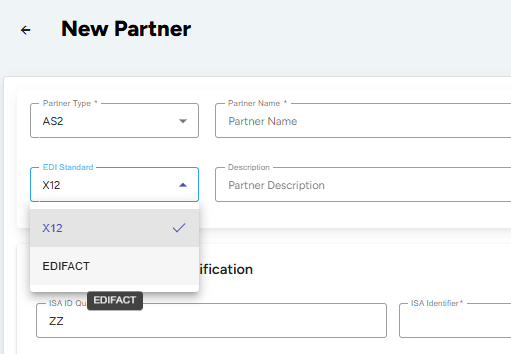
To expand our platform’s capabilities, EDI Generator now fully supports the EDIFACT standard alongside our existing X12 capabilities.
Tracking whether your trading partners have received and accepted your sent documents is critical. In this release, we have upgraded the message list views to show more granular status indicators for received Functional Acknowledgments (FA).
Previously, FAs with validation or syntax errors were often hidden from the list view, and status tags were generic. Now, the system maps exact acknowledgment codes to clear UI representations and allows you to filter them in the message list toolbars.
Here below the new statuses introduced and values mapped for X12 and EDIFACT:
| Status Display Name | Description | X12 997 Code | EDIFACT CONTRL Code |
|---|---|---|---|
| FA Received - Accepted | The transaction was fully accepted by the partner without errors. | A (Accepted) | 1, 5, 7, 8 (Accepted / Acknowledged) |
| FA Received - Transaction Accepted with Errors | The transaction was accepted, but the partner identified minor validation errors. | E (Accepted with Errors) | 2, 3 (Accepted with Errors / Warnings) |
| FA Received - Transaction Rejected | The transaction was rejected by the partner. | R (Rejected) | 4, 6 (Rejected) |
| FA Received - May Contain Errors | The FA contains validation or syntax errors, but includes a matching control number. | F (Validation Failures) | F (Validation Failures) |
Note: In the case of syntax/validation errors (marked as F), the associated transaction will now be correlated to the original relevant message list if there is a matching control number, indicating to you that attention is required.
To make search and monitoring easier, these new FA status filters — FA Accepted, FA Accepted with Errors, FA Rejected, and FA May Contain Errors — have been added to the toolbar across all outgoing message list views, in that order from left to right.

To streamline the editing process, we have implemented the capability to directly upload a pre-prepared EDI file into the EDI Editor. Previously, users had to manually fill in the editor forms segment-by-segment. Now, you can simply select a file containing raw EDI content.
The editor reads the uploaded file and populates the form with all successfully parsed EDI segments and elements. If the file contains syntax errors, unrecognized segments, or unparsed content, the system will display a warning notification, alerting you to review the file structure.

As a part of our user interface and user experience modernization initiative, we have also revamped several core areas of the interface in this version.
All updates are now live on your EDI Generator dashboard. We hope these new capabilities make your daily EDI workflows smoother and more powerful! If you have any questions or need assistance setting up your first EDIFACT trading partner, please feel free to reach out to our support team.
Stay tuned for what’s coming next!
Get full access to whichever product fits your needs. Configure real trading partner connections, run end-to-end transactions, and see the platform perform before making any commitment. All three products include a free 30-day trial with no restrictions.