





![Open-Source Transfer vs Managed File Transfer [Updated 2026]](/assets/images/blog/open-source-transfer-vs-managed-file-transfer.png)







Hosted SaaS solution for AS2 and SFTP file transfer. No infrastructure, instant setup.
Start Free Trial
Set up an AS2 gateway for secure file transfer in minutes. Stations, partners, MDNs, automation and monitoring for reliable B2B data exchange. Start free.

Ashan Praboda
Published: 11 Jun 2026

An AS2 gateway is software that exchanges files with trading partners securely using encryption, digital signatures, and MDN receipts. To set up an AS2 gateway for secure file transfer, you register your organization, create a station as your AS2 identity, exchange configuration details with your partner, then send a test message and confirm the MDN. The whole handshake takes about 15 minutes once both sides share their AS2 ID, endpoint URL, and certificates.
Secure file transfer is essential for any business that exchanges sensitive data. Whether it’s invoices, purchase orders, or shipping notices, these documents must reach trading partners safely and without errors.
An AS2 gateway helps make this possible. It uses encryption, digital signatures, and MDN acknowledgments to ensure every file is delivered securely and verified upon receipt. Instead of relying on manual processes or basic file transfer methods, businesses can build a reliable and automated B2B data exchange system.
Read more: What is an AS2 Message Disposition Notification (MDN)?
What makes modern AS2 gateways even more practical is their flexibility. They are not limited to a single environment or deployment model. For example, an AS2 gateway can be installed on Windows, Linux, or macOS, depending on your infrastructure. It can also be deployed in enterprise environments whether that’s on your own cloud accounts like AWS, GCP, or Azure, or on containerized platforms such as Docker or Kubernetes.
For teams that prefer less maintenance, the same gateway can also be used as a fully managed SaaS solution. This flexibility allows businesses to choose what works best for their operations, whether it’s full control or convenience.
Another key advantage is scalability. Modern AS2 gateways are designed to handle everything from small file exchanges to very large files running into several gigabytes, which is especially important for industries dealing with bulk data or regulatory submissions. In fact, some implementations also support compliance-driven workflows such as submissions to regulatory bodies like the FDA or EMA.
Behind the scenes, these systems are built on stable, enterprise-grade architectures. They typically use relational databases such as MySQL, PostgreSQL, or Microsoft SQL Server to manage message tracking, configurations, and audit logs-ensuring both reliability and traceability.
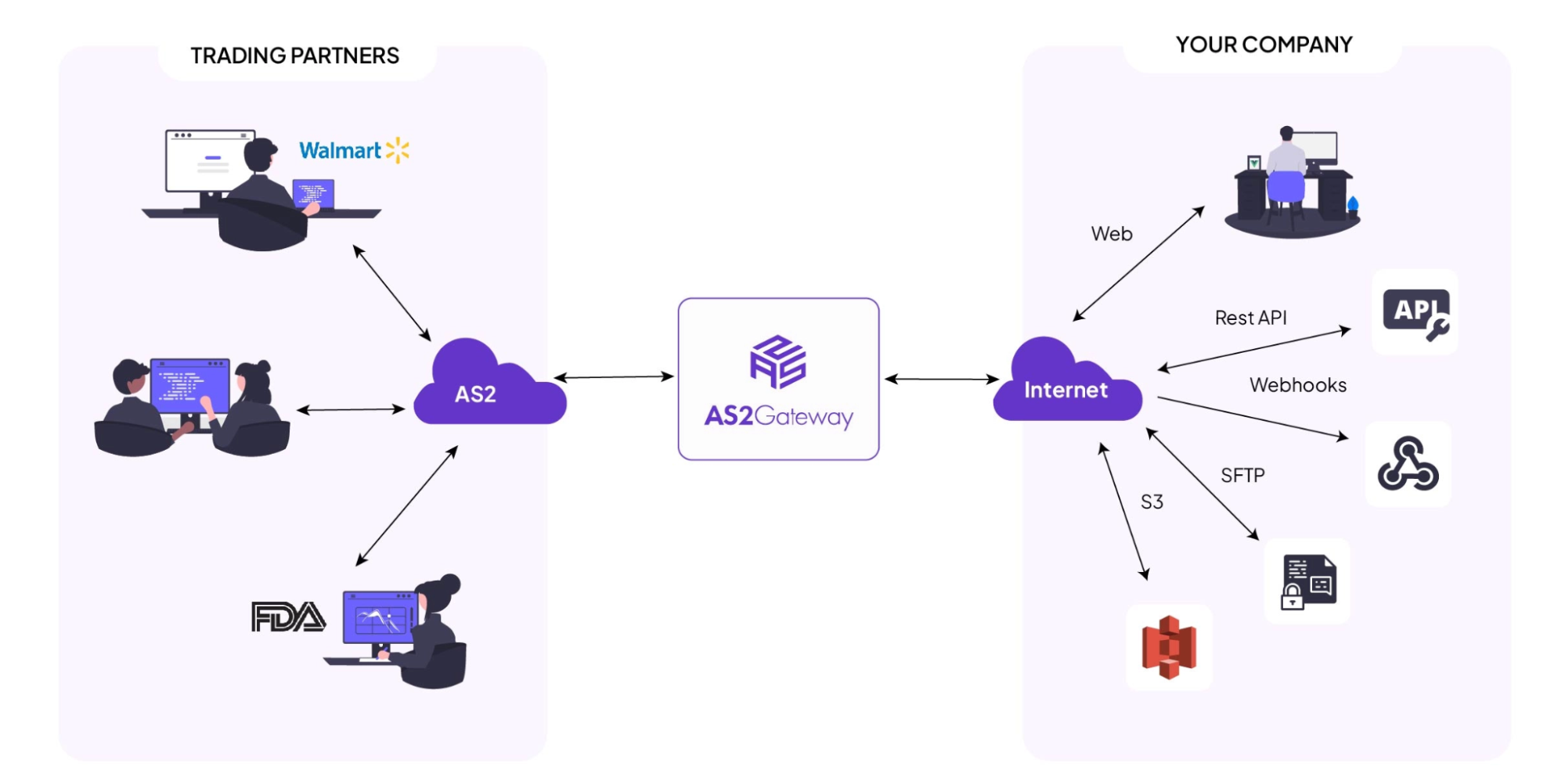
AS2 Gateway
Getting started with an AS2 gateway begins with setting up your organization and building trust with your trading partners.
First, register your organization in the AS2 gateway. This gives you an admin account and allows you to add users later with different access levels-for example, managing messages, configurations, or certificates.
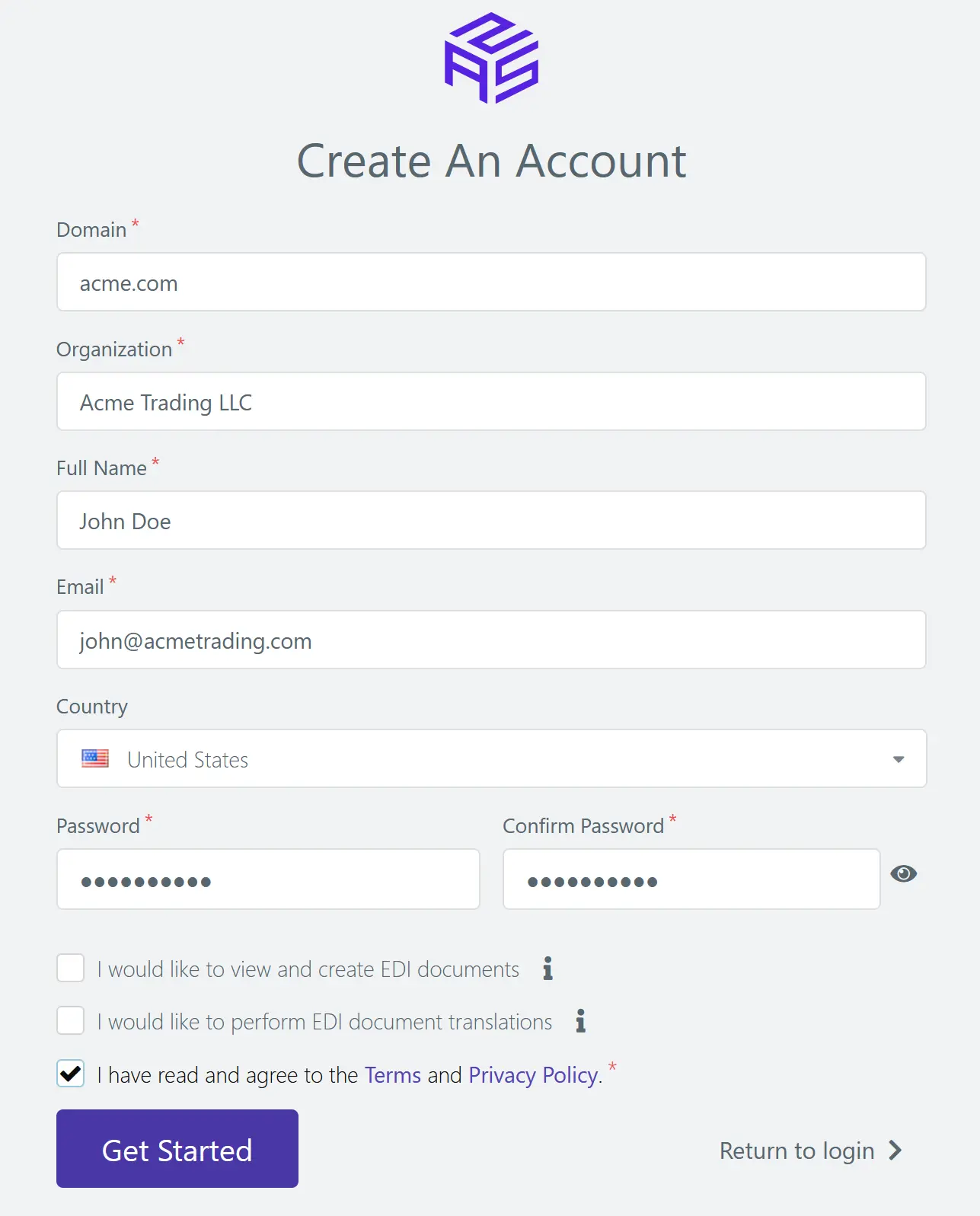
After the registration you can log into the AS2 Gateway with your credentials . The next part is the most important and that is to create a station, which acts as your organization’s identity within the AS2 system. This is what your trading partners will recognize when exchanging messages with you.
You begin by creating your AS2 station, which represents your business. You can simply go to the Station page and can create a Station by filling the mandatory details.
Once your station is created, share its public configuration details such as AS2 ID, endpoint URL, and certificates with your trading partner. At the same time, your partner will share their configuration details with you. You’ll use these to set them up as a trusted partner in your system.
Then you configure your trading partner using the details they’ve provided.
Both sides must complete this setup correctly before any files can be exchanged. Once done, you’re ready to test the connection.
Testing is an important step before going live.
Start by sending a message from your station to your partner. If everything is configured properly, you’ll receive an MDN (Message Disposition Notification) confirming successful delivery.
Then ask your partner to send a test message back. This ensures your system can receive and process incoming files correctly.
Once both directions are working, your AS2 connection is ready for real-world use.
After setup, it’s helpful to understand how messages move through the system.
When you send a file, it first goes into the Outbox, where it waits in a queue before being transmitted. This helps manage delivery and retries.
If the message is delivered successfully, it moves to the Sent mailbox. If something goes wrong and retries are exhausted, it is moved to the Failed mailbox, where you can review and retry it manually.
Incoming messages from partners are placed in the Inbox, ready for processing.
To send a message, you typically use a “Compose Message” option, where you select the partner, attach your file, and initiate the transfer.
Manual file handling may work initially, but it quickly becomes inefficient as your business grows.
Automation allows your AS2 gateway to connect directly with your internal systems, making secure file transfer faster and more reliable.
Common integration options include:
With these integrations, your B2B data exchange becomes seamless. Files can move automatically between your ERP system and your trading partners without manual intervention.
You can also explore:
Automation works best when you have visibility into what’s happening.
A good AS2 gateway provides monitoring tools that help track message status, detect failures, and ensure reliability.
For API-based submissions, errors are usually immediate. However, for methods like SFTP, issues may not be obvious right away.
Common reasons include:
In these cases, files are typically moved to an error directory, and notifications are triggered.
Sometimes messages fail during transmission due to network issues or partner system errors.
Most systems automatically retry delivery, but if retries fail, the message is marked as failed.
To stay on top of this, you can:
For more guidance on secure data exchange practices, refer to the National Institute of Standards and Technology.
To ensure the security of the AS2 Gateway, different types of strategies are used.
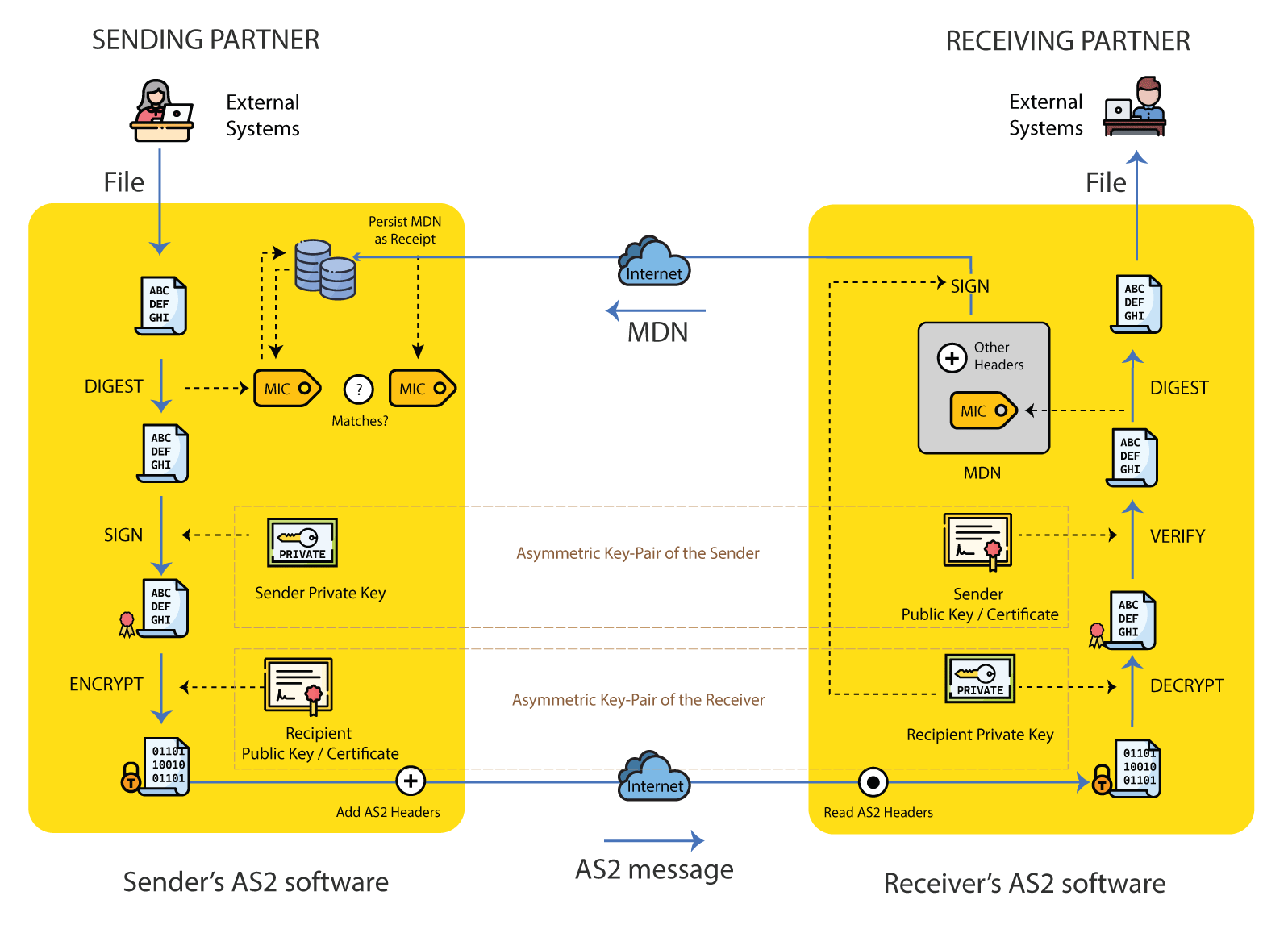
Every message is encrypted before it’s sent and decrypted only by the intended recipient. Digital signatures ensure that the message hasn’t been altered during transmission.
MDNs act as proof of delivery, confirming that the message was received successfully.
To maintain strong security, you should:
These practices ensure your secure file transfer process remains protected.
Enhanced security: AS2’s use of encryption and digital signatures significantly reduces the risk of data breaches. Businesses can confidently exchange sensitive information without any fear.
Regulatory compliance: Many industries have stringent compliance requirements for data protection. AS2 helps organisations meet these requirements, ensuring smooth audits and avoiding penalties.
Cost efficiency: By leveraging the internet for data transfer, AS2 eliminates the need for expensive dedicated communication lines, reducing operational costs.
Reliability: The MDN acknowledgement process ensures that messages are delivered and processed successfully, providing confidence in business critical data exchanges.
Global adoption: With major players like Walmart, Amazon, and the healthcare industry mandating AS2 for data exchange, its adaptation has become essential for businesses aiming to collaborate globally.
As your business grows, your AS2 setup should grow with it.
A scalable gateway allows you to handle more trading partners, higher file volumes, and more complex workflows without disruption.
This includes:
Cloud-based systems make scaling easier by removing infrastructure limitations.
To keep your AS2 gateway running reliably, focus on consistency and proactive maintenance.
Small improvements in maintenance can prevent major disruptions later.
Setting up an AS2 gateway for secure file transfer may seem complex, but breaking it into steps makes it manageable.
From creating your station and configuring trading partners to automating workflows and monitoring failures, each step plays an important role.
A well-configured AS2 gateway gives you:
For businesses that rely on B2B data exchange, this is a critical part of operations.
Once both you and your trading partner have exchanged AS2 IDs, endpoint URLs, and certificates, the core setup takes about 15 minutes. You register your organization, create a station, add the partner, then send a test message and confirm the MDN. Most delays come from waiting on a partner’s configuration details, not the software itself.
Yes. AS2 relies on public-key cryptography, so each side generates a certificate and shares its public key with the other. The certificate enables encryption and digital signatures, which protect the file in transit and prove the sender’s identity. Self-signed certificates are common in AS2 because partners exchange them over trusted channels during setup.
An MDN (Message Disposition Notification) is a digital receipt confirming your AS2 message was received and processed successfully. It can be signed and includes a checksum the sender uses to verify the file arrived unaltered. MDNs can be synchronous (returned on the same connection) or asynchronous (sent back separately), and they provide the non-repudiation AS2 is known for.
Yes. An AS2 gateway connects to your internal systems through SFTP, cloud storage such as Amazon S3, REST APIs, and webhooks. These let files move automatically between your ERP and your trading partners without manual uploads, with notifications when messages or MDNs arrive.
Both. A modern AS2 gateway installs on Windows, Linux, or macOS, deploys to AWS, GCP, or Azure, or runs in Docker or Kubernetes. Teams that prefer minimal maintenance can use the fully managed SaaS version instead. The choice comes down to how much control versus convenience you need.
Yes. AS2 combines encryption, digital signatures, and MDN-based non-repudiation, and remains mandated by retailers and healthcare partners like Walmart and Amazon suppliers. It’s actively maintained and still the default for compliant B2B document exchange.
Ready to set up your AS2 gateway? Aayu Technologies’ AS2 Gateway runs on-premises, in your cloud, or as managed SaaS, with a 30-day free trial, no credit card required. Start your free trial.
Join hundreds of organizations already taking full control of their B2B AS2 communications with our trusted solutions. Contact us today to tailor a solution that fits your specific AS2 EDI needs.
Get full access to whichever product fits your needs. Configure real trading partner connections, run end-to-end transactions, and see the platform perform before making any commitment. All three products include a free 30-day trial with no restrictions.







