











Hosted SaaS solution for AS2 and SFTP file transfer. No infrastructure, instant setup.
Start Free Trial
Compare Open-Source Transfer vs Managed File Transfer in 2026. Learn security, automation, compliance benefits and why businesses choose Managed File Transfer.

Sandeepani Rathnayaka
Published: 16 Sep 2026
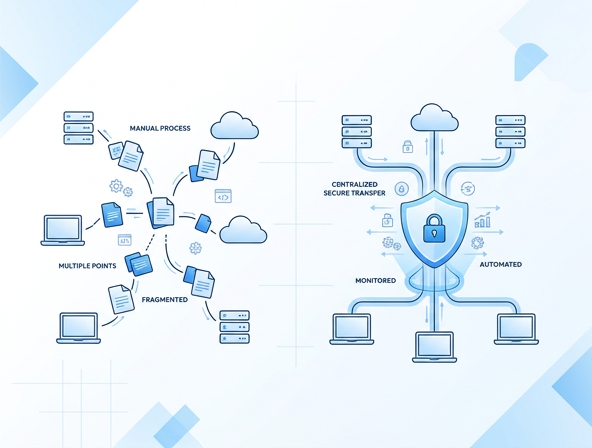
Businesses exchange thousands of files every day. These files may include EDI documents, financial data, healthcare records, and business transactions. Because of this, companies must choose the right way to transfer files securely.
This is where the comparison between Open-Source Transfer vs Managed File Transfer becomes important.
Open-source tools are attractive because they are free and flexible. However, many organizations later realize that security risks, lack of monitoring, and manual management can create serious problems.
Managed File Transfer (MFT) solutions solve these challenges by providing secure, automated, and monitored file transfers.
In this guide, we will explain the difference between Open-Source Transfer vs Managed File Transfer, their advantages, and when businesses should move to a managed solution.
Open-source file transfer tools allow organizations to send and receive files using community-developed software. These tools are usually free and can be customized based on business needs.
Many companies initially use open-source tools because they are easy to install and have no license cost.
Common examples include:
While open-source tools can work for small environments, they often require manual monitoring, maintenance, and security management.
Advantages of Open-Source Transfer
However, these benefits come with limitations when businesses grow.
Open-source file transfer systems may look simple at first. But they can create major operational challenges as data volumes increase.
Security is a major concern when transferring sensitive data.
Open-source tools usually depend on manual security configuration. This increases the risk of misconfigurations and vulnerabilities.
Businesses handling financial, healthcare, or EDI data need stronger protection.
Many open-source tools lack a central monitoring dashboard.
Without visibility, IT teams cannot easily track:
This makes troubleshooting difficult.
Open-source transfers often rely on manual scripts or cron jobs.
This leads to problems such as:
Automation becomes difficult to manage at scale.
Industries like healthcare, finance, and retail must follow strict compliance regulations.
Open-source tools usually lack built-in compliance support for standards such as:
Organizations may need additional tools to meet these requirements.
Managed File Transfer (MFT) is a secure and automated solution designed to manage, monitor, and control business file transfers.
Unlike basic open-source tools, MFT platforms provide enterprise-grade security, automation, and visibility.
A Managed File Transfer system ensures that every file transfer is:
Businesses use MFT solutions to safely exchange EDI documents, financial records, supply chain data, and confidential files.
Managed File Transfer platforms provide powerful features that simplify business data exchange.
MFT solutions use advanced security mechanisms such as:
This ensures data remains protected during transfer.
One of the biggest benefits of Managed File Transfer is full visibility.
Administrators can monitor all file transfers from a single dashboard, including:
Managed File Transfer systems automate repetitive processes such as:
Automation reduces manual work and improves reliability.
Many industries require strict compliance standards.
Managed File Transfer platforms include built-in auditing and compliance tracking, helping organizations meet regulatory requirements more easily.
Understanding the difference between Open-Source Transfer vs Managed File Transfer helps organizations choose the right solution.
| Feature | Open-Source Transfer | Managed File Transfer |
|---|---|---|
| Security | Basic security configuration | Enterprise-level encryption and security |
| Monitoring | Limited or manual | Centralized monitoring dashboard |
| Automation | Requires scripting | Built-in workflow automation |
| Compliance | Limited support | Compliance-ready with audit trails |
| Reliability | Depends on manual management | Highly reliable and scalable |
Because of these advantages, many businesses eventually migrate from open-source tools to Managed File Transfer solutions.
As organizations grow, their file transfer requirements become more complex.
They need solutions that provide security, reliability, and scalability.
Here are the main reasons companies move from open-source tools to Managed File Transfer:
Sensitive data requires strong encryption, authentication, and access control.
Managed File Transfer solutions provide enterprise-grade protection.
MFT platforms reduce transfer failures by providing automated retry mechanisms and monitoring tools.
This ensures business operations run smoothly.
Instead of managing multiple scripts and tools, organizations can control all file transfers from one system.
This reduces operational complexity.
Many organizations exchange EDI documents with partners, suppliers, and customers.
EDI transactions require reliable and secure data exchange.
Managed File Transfer platforms help businesses:
When combined with EDI platforms, Managed File Transfer creates a fully automated data exchange ecosystem.
At Aayu Technologies, businesses use MFT Gateway to securely manage and automate file transfers.
MFT Gateway is designed to support modern B2B communication and EDI workflows.

Key benefits include:
Organizations using MFT Gateway can improve security, visibility, and operational efficiency when handling large volumes of files.
Organizations should consider upgrading to Managed File Transfer when they experience:
If your business relies on secure data exchange, Managed File Transfer becomes a critical solution.
The comparison between Open-Source Transfer vs Managed File Transfer shows that both options have their place.
Open-source tools may work for small teams or basic file transfers.
However, growing organizations need secure, reliable, and automated solutions.
Managed File Transfer provides the visibility, security, and automation required for modern business operations.
As data exchange continues to grow, many organizations are choosing Managed File Transfer platforms like MFT Gateway to simplify and secure their workflows.
If your organization is still relying on manual or open-source transfer tools, it may be time to upgrade.
Discover how MFT Gateway can help your business achieve secure, reliable, and automated file transfers.
Contact Aayu Technologies today to learn more about Managed File Transfer solutions.
Join hundreds of organizations already taking full control of their B2B AS2 communications with our trusted solutions. Contact us today to tailor a solution that fits your specific AS2 EDI needs.
Get full access to whichever product fits your needs. Configure real trading partner connections, run end-to-end transactions, and see the platform perform before making any commitment. All three products include a free 30-day trial with no restrictions.