







![Open-Source Transfer vs Managed File Transfer [Updated 2026]](/assets/images/blog/open-source-transfer-vs-managed-file-transfer.png)




Hosted SaaS solution for AS2 and SFTP file transfer. No infrastructure, instant setup.
Start Free Trial
Validate X12 and EDIFACT files online for free. Catch missing segments, invalid codes, syntax errors, version mismatches, and structural issues instantly.

Udith Gunaratna
Published: 14 Oct 2026

Paste or upload an EDI file. Pick a version and a transaction type. Get a list of exactly what’s wrong, with the offending segments highlighted in-line. No account creation, no payments, no sales call.
Every EDI integrator knows this moment. A trading partner emails: “Your 850 was rejected.” Attached is a 997 with an AK5 of R and a code you have to look up. Or worse, no acknowledgement at all, just an email or a phone call saying the order never landed.
So you open the file. Six hundred segments of asterisks and tildes. Somewhere in there is a date in the wrong format, a qualifier that isn’t in the code list for that version, or a segment sitting one loop away from where the spec says it belongs.
The usual options are all bad:
The EDI Validator in EDI Generator lets you validate EDI files online, free, and exists to collapse that loop to about ten seconds.
It’s a free X12 validator and EDIFACT validator - a publicly available utility with no login that lets you validate EDI files online against the base standard specifications.
You give it four configurations (three for EDIFACT):
| Configuration | Example | Notes |
|---|---|---|
| Standard | X12 or EDIFACT |
Toggle at the top; everything else re-defaults to match it |
| Version | 4010, 5010, D96A, D24A |
25 X12 versions (3030 → 7040) and 58 EDIFACT releases (D95A → D24A) supported |
| Transaction / message type | 850, 810, ORDERS, INVOIC |
326 X12 transaction sets, 196 EDIFACT message types supported |
| Separators | * and ~ |
X12 only; EDIFACT separators are derived from the UNA segment itself or the standard separators |
Then you paste the EDI into the editor (or hit the upload button and pick a file off disk) and click Validate EDI.
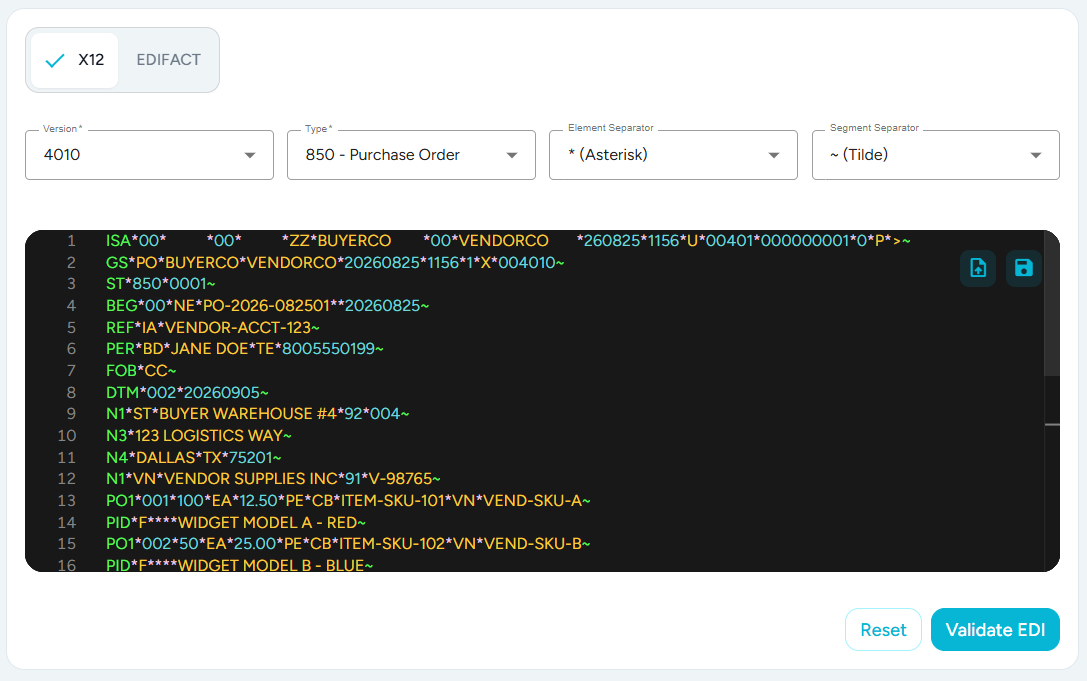
The interesting part is that this isn’t one pass. Validation runs as a fail-fast pipeline, and understanding the layers tells you a lot about how to read the output.
Before anything else, the interchange envelope is parsed and reconciled: ISA/IEA and GS/GE for X12, UNB/UNZ and UNG/UNE for EDIFACT. This layer catches the structural failures that make the rest of the file meaningless:

It also cross-checks your dropdown selections against the file, which catches a surprisingly common class of bug: validating against the wrong spec and then chasing phantom errors.
And for X12, the separators you configured are reconciled against the ones actually resolved from the ISA segment. If you told it * but the file uses |, you’re told so directly instead of getting a wall of nonsense parse errors.
If the envelope fails, processing stops there. There’s no point validating transactions inside an interchange that isn’t well-formed.
Once the envelope is clean, every transaction in the interchange is walked against the base specification for your chosen version and transaction type.
This is the layer that answers “is this segment allowed to be here, and is anything missing?”:
Notice what the first one really tells you. It isn’t just “BEG is missing”. It’s “I expected BEG at this point and found your REF instead.” That distinction is the whole game when a file is subtly out of order, because the actual defect is usually a segment in the wrong place rather than one that’s absent.

It understands loops, repeat counts, and max-use, so it catches the errors a naive line-by-line checker misses entirely: a required segment omitted, an N1 loop repeated more times than the spec allows, a segment that’s valid in the file but sitting in the wrong loop, a segment repeated past its permitted maximum.
Each transaction in the interchange is validated and reported independently, keyed by its control number (ST02 / UNH01). A 10-transaction interchange where only the third one is broken tells you exactly that.
The deepest layer inspects the data inside each segment against the element dictionary:
AN alphanumeric, DT dates, TM times, N/R numerics, ID code lists0999 actually a valid Date/Time Qualifier in this version?P), required (R), exclusion (E), conditional (C), and list-conditional (L) relationships between elements in a segmentThe messages name the segment, the element description, and the element’s dictionary code:

That last category, syntax rules, is the one people most often skip when they hand-roll a validator, and it’s a frequent source of partner rejections.
Two things happen when validation completes.
On the right, a results panel breaks down into the envelope plus one card per transaction. Clean ones collapse to a green Valid badge. Broken ones show an error count and expand into the full list.
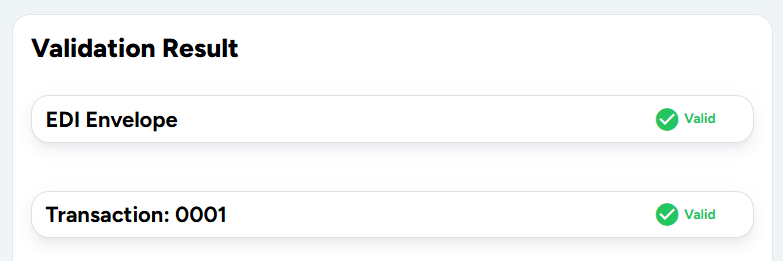
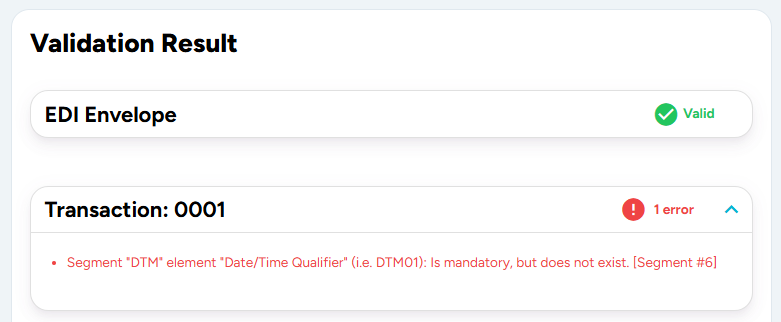
In the editor, every error is mapped back to its source line. The segment number in [Segment #12] is resolved relative to that transaction’s ST/UNH line, so the offending segments get a red line decoration, a glyph in the margin, and a hover tooltip carrying the message. You’re reading errors on the data, not in a list you have to cross-reference by hand.
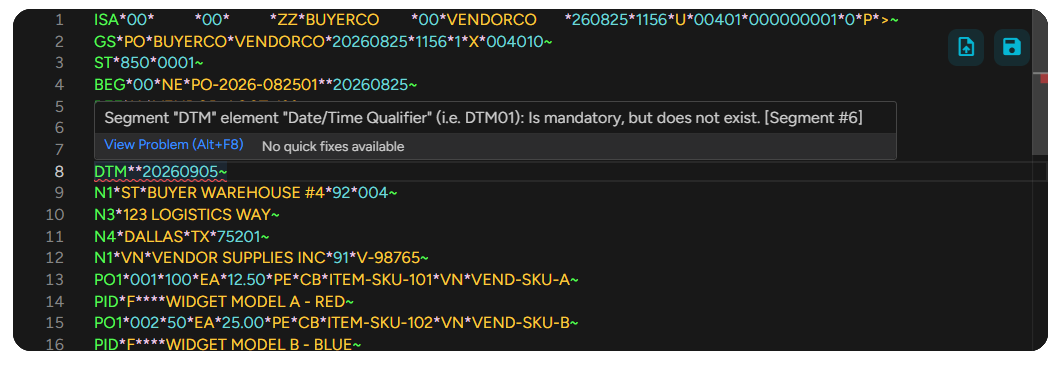
Here’s a small 4010 850 with a deliberate mistake:
ISA*00*          *00*          *ZZ*BUYERCO        *00*VENDORCO       *260825*1156*U*00401*000000001*0*P*>~
GS*PO*BUYERCO*VENDORCO*20260825*1156*1*X*004010~
ST*850*0001~
BEG*00*NE*PO-2026-082501**20260825~
REF*IA*VENDOR-ACCT-123~
PER*BD*JANE DOE*TE*8005550199~
FOB*CC~
DTM*0999*20260905~
N1*ST*BUYER WAREHOUSE #4*92*004~
N3*123 LOGISTICS WAY~
N4*DALLAS*TX*75201~
N1*VN*VENDOR SUPPLIES INC*91*V-98765~
PO1*001*100*EA*12.50*PE*CB*ITEM-SKU-101*VN*VEND-SKU-A~
PID*F****WIDGET MODEL A - RED~
PO1*002*50*EA*25.00*PE*CB*ITEM-SKU-102*VN*VEND-SKU-B~
PID*F****WIDGET MODEL B - BLUE~
CTT*2*150~
AMT*TT*2500.00~
SE*17*0001~
GE*1*1~
IEA*1*000000001~
Select X12 / 4010 / 850, separators * and ~, and validate. You get back:
ISA/IEA and GS/GE reconcile, ISA12 is 00401 and GS08 starts with 004010, matching the selected version.DTM01 qualifier 0999 is flagged, and the DTM line is highlighted in red in the editor.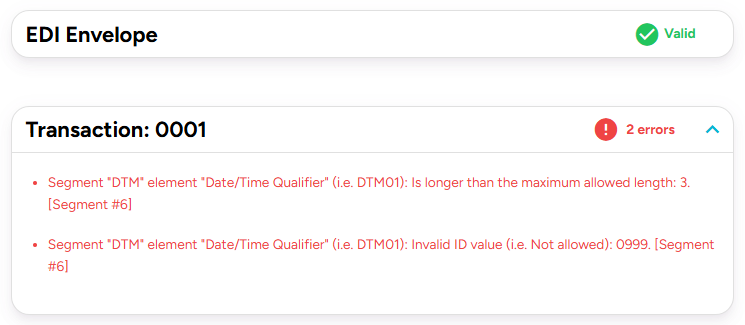
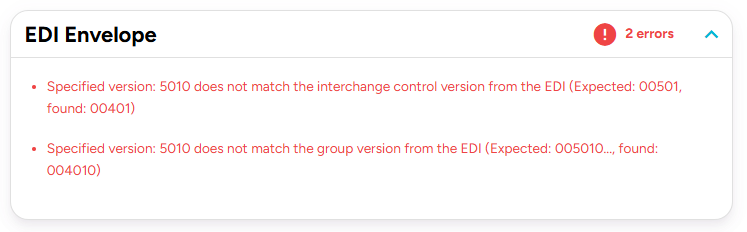
Now change the version dropdown to 5010 without touching the file. Layer 1 stops you immediately with a version mismatch, rather than letting you burn ten minutes chasing errors that were never real.

EDIFACT support isn’t a bolt-on. Switch the toggle and the entire form re-defaults to D00A, ORDERS, while the version and message-type lists swap to the UN/EDIFACT directories.
The nicest touch: separators are detected from the file as you type. If your payload opens with a UNA service string advice, the element and segment separators are read straight out of it and applied to the editor’s tokenizer live. Paste an EDIFACT file that uses non-standard delimiters and it just works, with no configuration. If the UNA segment is missing, the validator falls back to the standard EDIFACT separators.
Envelope validation follows the EDIFACT model properly, including UNG/UNE group reconciliation and cross-checking the group’s message type and version against what you selected.
This validator checks your file against the base standard. It does not know that your specific partner requires REF*DP on every line item, needs a 10-digit purchase order number, or rejects anything without a TD5. Those are partner-specific implementation guidelines, and they’re where most real-world rejections come from. A file can be perfectly valid X12 and still be rejected by a partner whose guideline is stricter.
So use the free validator for what it’s outstanding at:
Partner-specific validation, saved documents, an EDI-to-JSON model, generation from templates, acknowledgement handling, and connectivity to your trading partners are what EDI Generator does as a product. The free validator is the same engine with the partner layer switched off.
If the free tool keeps telling you your files are valid and your partner keeps rejecting them, that gap is exactly the problem the EDI Generator product solves.
An EDI validator checks an X12 or EDIFACT interchange against the structural and syntax rules defined by the standard — envelope segments, mandatory and optional segments, loop and repeat limits, element data types, and code lists — and reports exactly which parts of the file don’t conform.
Yes. The EDI Validator in EDI Generator validates X12 interchanges across 25 versions (3030–7040) and 326 transaction sets, at no cost and without creating an account.
Yes. The same tool supports 58 EDIFACT releases (D95A–D24A) and 196 message types, including automatic separator detection straight from the file’s UNA segment.
No — it validates against the base standard only. Partner-specific implementation guidelines (for example, requiring REF*DP on every line item) are checked by the partner-specific validation layer in the full EDI Generator product, not the free validator.
No. It’s accessible with no login, no payment, and no sales call.
Join hundreds of organizations already taking full control of their B2B AS2 communications with our trusted solutions. Contact us today to tailor a solution that fits your specific AS2 EDI needs.
Get full access to whichever product fits your needs. Configure real trading partner connections, run end-to-end transactions, and see the platform perform before making any commitment. All three products include a free 30-day trial with no restrictions.