











Hosted SaaS solution for AS2 and SFTP file transfer. No infrastructure, instant setup.
Start Free Trial
AS2 certificate expired? Learn to tell TLS errors from AS2 errors, confirm the cause in 4 checks, and renew without downtime. Plus automated expiry alerts.

Sandeepani Rathnayaka
Published: 19 Nov 2026

TL;DR: An AS2 certificate expiry stops EDI exchanges because partners can no longer verify your signatures or decrypt your files. Check the error first: TLS errors such as “certificate has expired” point to an HTTPS certificate, while MDN errors such as decryption-failed or authentication-failed point to an AS2 certificate. To fix it, replace the expired certificate, share only the public certificate with your partner, schedule the switch, and test in both directions. To prevent the next one, start renewals 30 to 60 days ahead (60 to 90 days for slow-moving partners).
Every business that relies on Electronic Data Interchange (EDI) knows how fast operations move. Orders flow in automatically, invoices get processed, and shipments leave the warehouse on time. But then, without any warning, everything stops. Purchase orders fail, partner portals throw errors, and your IT team scrambles to find out what went wrong.
In many cases, the main cause is an AS2 certificate expiry. An expired digital certificate quietly stops data transfers between trading partners. Because Applicability Statement 2 (AS2) relies heavily on encryption and digital signatures, an expired key means your system no longer trusts incoming or outgoing files.
Understanding how to fix an AS2 certificate expiry helps you avoid costly downtime, keep your trading partner connections active, and protect your supply chain operations.
When troubleshooting a failed connection, you must know where the failure occurred. AS2 communication happens in two different security layers: the Transport Layer (TLS/HTTPS) and the AS2 Protocol Layer.
AS2 messages can be sent over plain HTTP or over HTTPS. When you or your partner use an HTTPS endpoint, your AS2 software first opens a secure TLS connection before it sends any files. If the SSL/TLS certificate on either side expires (your partner’s server or your own inbound endpoint), that connection fails immediately. Connections that use plain HTTP aren’t affected by TLS certificate expiry, but the AS2 certificates described below still apply.
Once the connection is open (over HTTP or HTTPS), your AS2 engine takes over to process encrypted data. An AS2 certificate expiry at this level means your system cannot verify signatures or decrypt files:
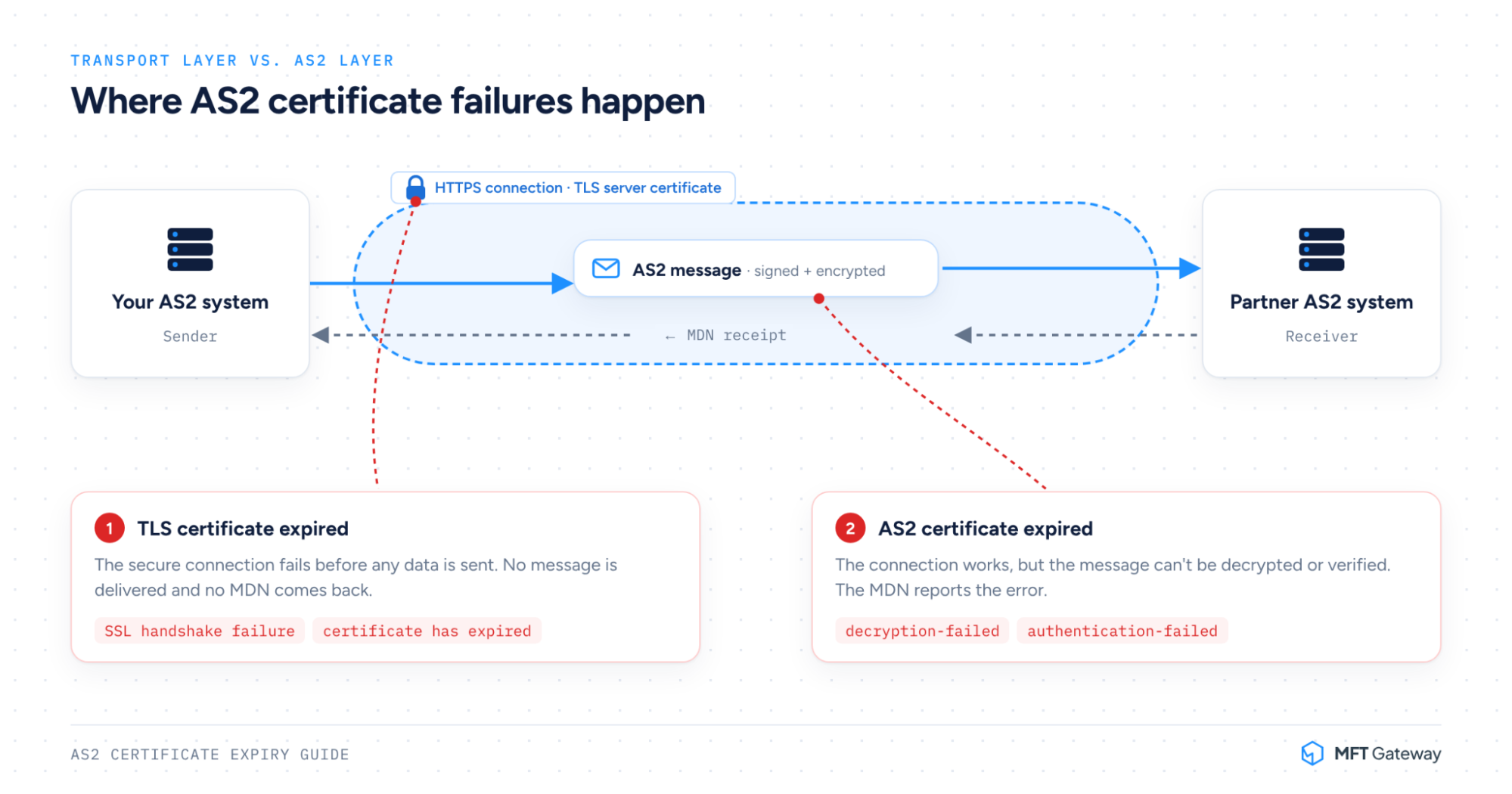
AS2 protocols protect sensitive business transactions using public key security. To communicate safely, both you and your partner exchange public keys. Your system uses your partner’s public key to encrypt data, and your partner uses your public key to verify your identity.
When an AS2 certificate expiry date passes, most AS2 systems (yours or your partner’s) will reject messages signed or encrypted with that certificate. Here is what happens next:
Because this issue happens at the security layer, your primary software may not give you a direct warning. It simply reports that messages failed to deliver.
A broken AS2 connection is never just a minor technical problem. It immediately impacts business operations and cash flow.
When retail giants send purchase orders via AS2, an expired key drops those messages into error queues. You miss order windows, delay delivery dates, and frustrate your buyers. See a real example: AS2 certificate expiration for a Walmart EDI connection →
Many major enterprises enforce strict Service Level Agreements (SLAs). If your technical downtime delays data processing, partners often issue heavy chargebacks or penalty fines.
Maintaining strong trading partner connections over EDI via AS2 requires consistency. When your connection drops out of nowhere, partner support teams spend valuable hours troubleshooting errors on their end.
MFT Gateway makes these checks easy. On the Certificates page, you can see every station and partner certificate in one list, with its Expire On date, so you can spot expired or soon-to-expire certificates at a glance. To find failed transfers, open Sent Messages or Received Messages and filter by MDN Status. Each failed message shows the MDN Failure Reason, such as decryption-failed or authentication-failed, so you can quickly confirm whether a certificate is the cause.
Not a certificate issue? Check our AS2 troubleshooting guide for other common errors →

Once you know which certificate has expired, these steps get traffic moving again. For the full planned renewal process, including overlap windows and partner coordination, see our AS2 certificate renewal guide →
If your own certificate expired, generate a new self-signed certificate or request a new one from your certificate authority. If your partner’s certificate expired, ask them for their new public certificate.
Export your new public certificate in a standard format (such as .cer or .crt) and send it to your partner’s EDI integration team, with the date and time you plan to activate it. Never share your private key with anyone.
Agree on an activation time with your partner, ideally during off-peak hours. Where your software allows it, keep the old certificate available for a short overlap period so messages already in transit are not rejected.
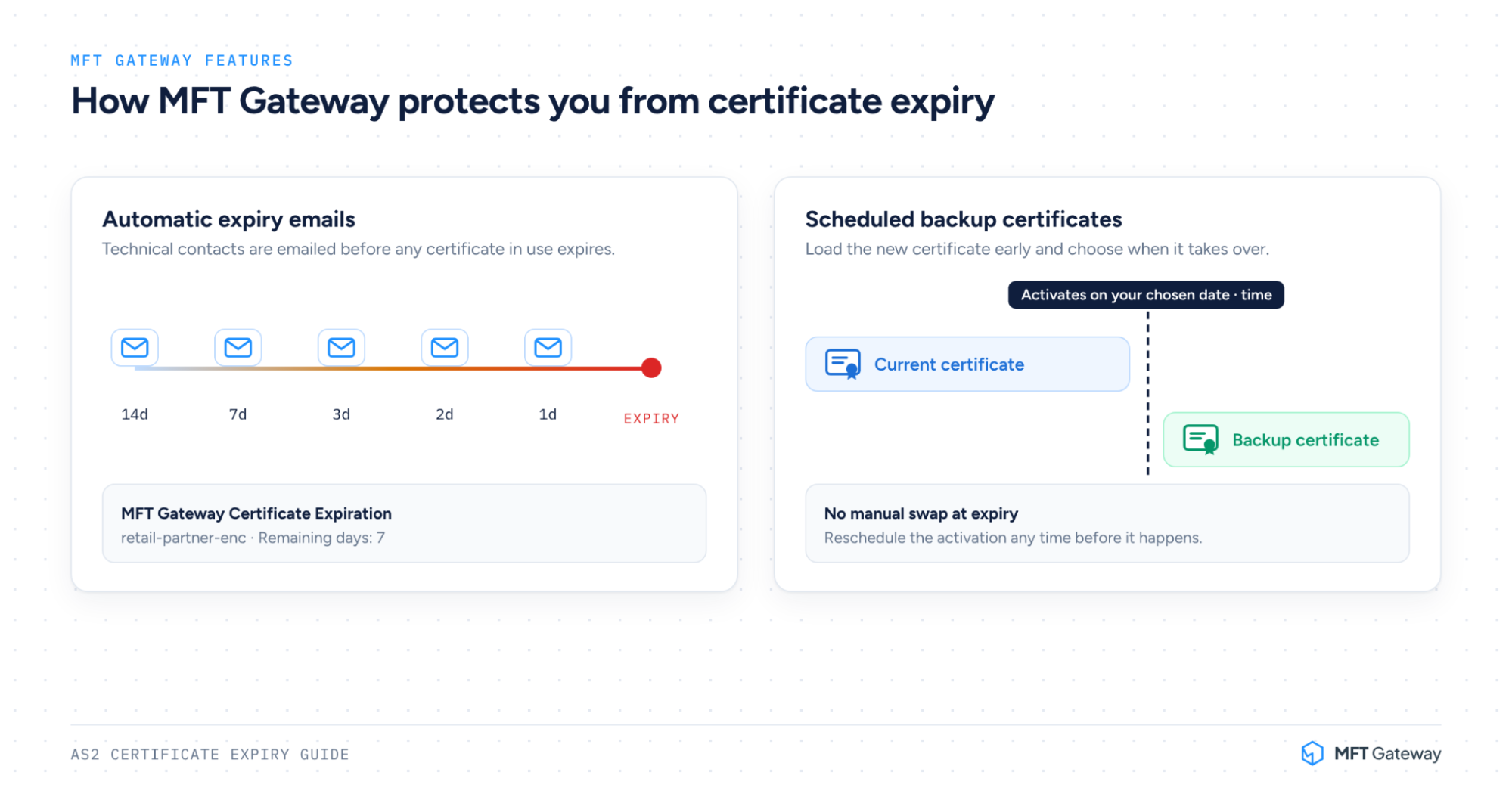
In MFT Gateway, you can schedule the switch in advance instead of doing it by hand:
You can reschedule the activation any time before it happens.
Send a test document (such as an 850 Purchase Order or 846 Inventory Inquiry/Advice) and confirm that sending, receiving and MDNs all pass without errors. Then re-send any documents that failed while the certificate expired.
You do not need to live in fear of your next AS2 certificate expiry. Adopting simple automation habits protects your system from accidental downtime.
Most AS2 systems, including your partner’s, reject data signed or encrypted with an expired certificate. Transfers using it typically fail until a valid certificate replaces the expired one.
Start with the error. TLS errors such as “certificate has expired” point to an HTTPS certificate, while MDN errors such as decryption-failed or authentication-failed point to an AS2 certificate. Then check the expiry dates of your own signing and encryption certificates and the certificates you hold for the partner, and ask your partner whether they have already switched to a new certificate.
Start at least 30 to 60 days before your AS2 certificate expiry, and 60 to 90 days ahead for partners that move slowly. This gives your trading partners enough time to update their systems without rushing.
Yes. In MFT Gateway, you can schedule a backup certificate for your own AS2 station, and backup encryption, signature verification or HTTPS certificates for each partner, with an activation date and time. You can reschedule the activation any time before it happens.
TLS certificates secure the HTTP transport connection between servers. AS2 certificates sign and encrypt the actual EDI data content inside the connection. Learn more about the types of AS2 certificates vs TLS →
An AS2 certificate expiry does not have to turn into a major business problem. By setting up automated alerts, maintaining clean documentation, and following a structured renewal process, you can protect your company from unexpected supply chain disruptions.
Don’t wait for a broken connection to reveal an expired key. Check your current certificates today to ensure your trading partner connections remain strong, secure, and fully operational.
Ready to stop worrying about expiry? Get automatic expiry alerts and scheduled certificate swaps with MFT Gateway. Start your 30-day trial.
Join hundreds of organizations already taking full control of their B2B AS2 communications with our trusted solutions. Contact us today to tailor a solution that fits your specific AS2 EDI needs.
Get full access to whichever product fits your needs. Configure real trading partner connections, run end-to-end transactions, and see the platform perform before making any commitment. All three products include a free 30-day trial with no restrictions.


