







![Open-Source Transfer vs Managed File Transfer [Updated 2026]](/assets/images/blog/open-source-transfer-vs-managed-file-transfer.png)






Hosted SaaS solution for AS2 and SFTP file transfer. No infrastructure, instant setup.
Start Free Trial
Learn how to customize AS2 retry settings in MFT Gateway to handle failed and incomplete messages, ensuring secure and reliable EDI communication.

Dinuka Ekanayake
Modified: 09 Jun 2026

AS2 retry settings control how MFT Gateway re-attempts delivery when a message fails or stays incomplete. You can apply two strategies: exponential backoff (3, 5, or 10 attempts, starting at 30 seconds and widening each time) or fixed interval (a set retry gap across a defined duration). Failed messages are retried automatically by default; incomplete messages can be retried with a custom count, applied separately for each type.
In AS2 (Applicability Statement 2) communication, reliable, on-time delivery is non-negotiable for B2B EDI transactions, but server outages, timeouts, and network failures still cause incomplete or failed messages. The fix is a solid AS2 retry mechanism: configurable AS2 retry settings that automatically re-send messages instead of losing them. This guide explains why retry logic matters, how MFT Gateway handles failed and incomplete messages, and how to customize retry counts and intervals for full control.
To ensure reliable delivery and prevent data loss, handling incomplete and failed message transmission scenarios in an AS2 gateway is a very important consideration. Therefore, systems must implement a strong AS2 message retry mechanism within the AS2 protocol to ensure messages that initially fail or time out are not lost but retried for successful delivery. Effective AS2 connectivity plays a key role in maintaining consistent and secure message exchange.
Products like MFT Gateway manage these incomplete and failed communications to ensure secure, accurate, and guaranteed delivery without any data loss. This blog explores why AS2 message retry logic matters, how it operates in MFT Gateway, and how organizations can customize retry settings for improved control and reliability.
In any system, message delivery can fail due to various technical reasons. It is better to understand why Failed or Incomplete Message failures occur, and understanding these kinds of scenarios will help in designing a good Message Retry mechanism. Below are some common scenarios that can happen across any system.
One of the most frequent reasons for delivery failure is transmission timeout failure. When a system is configured with an AS2 timeout setting, it waits for a specific duration after sending an AS2 message to receive the network-level (HTTP) response. If the response is not received from the receiving side within this period, the transmission is treated as a failure.
If the recipient’s AS2 server is temporarily unavailable due to maintenance or a system crash, it will result in a failed AS2 communication. In such cases, the sending system is unable to establish a connection, leading to a transmission failure.
Also, in two-way SSL communications, if client or server authentication fails, SSL handshake failures can occur, causing Failed AS2 communication. These handshake errors prevent the establishment of a secure connection, stopping the message exchange process.
Another common cause of message transmission failure is incorrect endpoint configuration or mismatched AS2 identifiers. If the endpoint URL is invalid or misconfigured, the system may return HTTP errors. Similarly, incorrect Station or Partner Identifiers can result in failed AS2 communication.
Both of the above-mentioned scenarios need to be handled within a retry logic to ensure reliable communication and to prevent issues such as resending duplicates or overloading the partner’s system.
Not sure why a message failed? Here’s how to read and debug an AS2 transmission log
In systems like MFT Gateway, for incomplete messages, such as when a trading partner accepts the message but fails to provide an acknowledgment within the specified transmission timeout or for failed messages like partner system downtimes, a message retry option is available with a specific retry count. Users can enable custom retries for incomplete messages with up to three different retry counts, while MFT Gateway automatically retries failed messages in scenarios like those mentioned above by default.
However, for incomplete messages, retrying may result in sending the same message again, causing duplicate messages to be stored on the partner’s end.
MFT Gateway provides two message retry strategies as Exponential Backoff and Fixed Interval. These retry options can be applied to both Incomplete and Failed messages.
Under the Exponential Backoff strategy, users can configure the maximum number of retry attempts by selecting from three options including 3 retries, 5 retries, or 10 retries. This setting can be customized separately for both incomplete and failed messages. If no option is selected, the system defaults to 10 retry attempts.
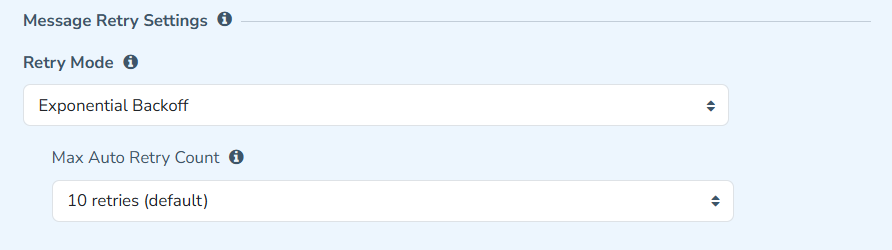
The retry intervals in MFTG are based on an exponential backoff strategy, starting from 30 seconds. For example, the 1st retry occurs after 30 seconds, the 2nd retry happens 1 minute after the 1st retry, the 3rd retry occurs 2 minutes after the 2nd retry, and so on. This logic is explained further in the grid below.
| Retry Attempt | Retry Interval |
| 1 | 0.5 min |
| 2 | 1 min |
| 5 | 8 min |
| 8 | 64 min |
| 10 | 256 min |
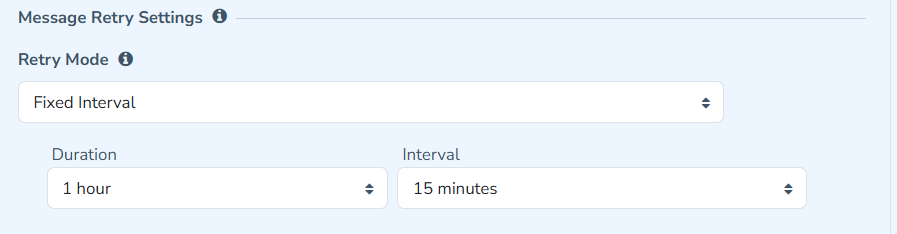
Under the Fixed Interval option, MFT Gateway allows users to configure both the Duration and Interval for the message retry process. This enables retry attempts to occur at consistent, fixed intervals within the defined time period.
For example, if a duration of 2 hours and an interval of 15 minutes are configured, MFT Gateway will retry the message every 15 minutes throughout the 2-hour period.
If you don’t select a retry option under exponential backoff, MFT Gateway defaults to 10 retry attempts. You can lower this to 3 or 5 attempts, and set the value separately for incomplete and failed messages so each failure type behaves the way your workflow needs.
A failed message hits an immediate, recognizable error - a bad URL, an SSL error, or outright rejection by the receiver - so the system knows it wasn’t delivered. An incomplete message was sent but never received its network-level (HTTP) response, so its true status is unknown and it needs careful retry handling to avoid duplicates.
It can. Because the partner may have already accepted the original, resending it can store a duplicate on their end. That’s why incomplete-message retries are configurable and should be tuned conservatively, while genuinely failed messages are safer to retry automatically.
Use exponential backoff (30s, then widening) when partner outages are usually brief, so you retry quickly then back off without hammering their server. Use fixed interval when you want predictable, evenly spaced attempts across a set window - for example, every 15 minutes over 2 hours.
A5: Backoff intervals widen each step, roughly 0.5 min, 1 min, then doubling, so by the 10th attempt the gap reaches about 256 minutes. The full 10-attempt cycle stretches over several hours, giving a downed partner system time to recover before the message is marked permanently failed.
AS2 message delivery is important for secure and timely B2B communication. Handling failed or incomplete messages is key to keeping systems reliable and efficient. Issues like timeouts, partner system downtime or other failures can interrupt the message flow. Using a reliable retry mechanism helps automatically manage these problems without needing manual action. By understanding the difference between failed and incomplete messages, and setting the right retry counts and time gaps, organizations can avoid data loss and make sure messages are delivered.
This helps maintain smooth, secure, and accurate EDI communication, even when temporary issues occur.
Looking for reliable and secure AS2 communication? Discover MFT Gateway, designed to ensure secure, accurate, and guaranteed message delivery without any data loss.
Start your 30-day free trial today and experience the solution with full setup assistance and ongoing support from our team.
Join hundreds of organizations already taking full control of their B2B AS2 communications with our trusted solutions. Contact us today to tailor a solution that fits your specific AS2 EDI needs.
Get full access to whichever product fits your needs. Configure real trading partner connections, run end-to-end transactions, and see the platform perform before making any commitment. All three products include a free 30-day trial with no restrictions.







